Review Your Cart

Your cart is empty.

You haven't added any eSIM packages yet. Start exploring our plans to get connected!

Browse our eSIM Packages
🎉 Welcome offer: 20% off with promo code FIRSTWELCOME20

United States United States   / University of Washington

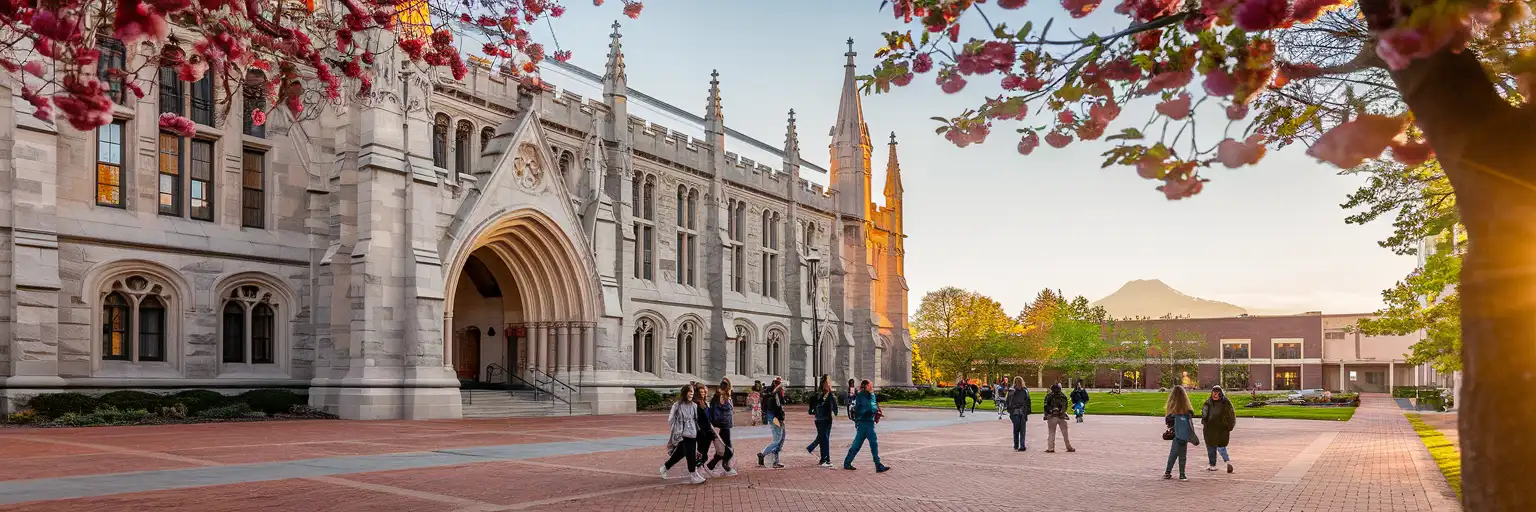
Suzzallo Library's Gothic facade at the University of Washington viewed from Red Square at golden hour

University of Washington eSIM: Campus Data That Works Across All USA

You're heading to the University of Washington with your class schedule to pull up, the campus shuttle tracker to check, and a rideshare from Seattle-Tacoma International Airport still to coordinate before orientation starts. With eSIMno, your USA data works the moment you land — no hunting for Eduroam passwords or standing in carrier store queues.
View Plans
GET A FULL20%OFFon your first order
Use code: FIRSTWELCOME20

Stay connected,
wherever you go

Seamless global eSIM coverage

Explore our plans below

Plan Your Trip

Tell us what you'll do and how long you'll be away — we'll highlight the right plan.

7 days
1102030

What will you do?

Tap an activity above to see which plan fits your trip

Already a customer?

EARN UP TOON EVERY FRIEND'S PURCHASE
NETWORK: AT&T & Verizon Wireless The speed may vary depending on the location.

Quick Facts

Time Zone
Pacific Time (PT, UTC-8 / UTC-7 DST)
Dialing Code
+1
Currency
US Dollar (USD, $)
Power Plug
Type A, B (flat 2-pin, common across North America)
Language
English
Emergency
911 (police, fire, ambulance)
eSIMno Networks
AT&T, Verizon Wireless

How to Get Your eSIM

  1. Choose Your UW Data Plan
    Pick the data allowance that matches your quarter — lighter plans for weekend visits, larger packages for full-term stays with streaming and video calls back home.
  2. Install at Home Before Your Flight
    Scan the QR code over your home WiFi before heading to the airport. The profile sits dormant until you activate it, so there's zero risk of burning data early.
  3. Activate After Landing at Sea-Tac
    Once your plane reaches the gate, switch off airplane mode. Your eSIM connects to AT&T or Verizon within seconds — ready before you reach the baggage carousel.
  4. Ride Link Light Rail to Campus
    Pull up OneBusAway or Google Maps for real-time train arrivals. The 1 Line runs from Sea-Tac to U District Station in about 45 minutes — your data keeps the trip stress-free.
  5. Stay Connected Across Campus and Beyond
    Your plan works from Suzzallo Library to Husky Stadium, and anywhere else in the USA. No roaming charges, no SIM swaps, no daily limits.

Traveler Tips

  • The cherry blossoms in the Quad peak around late March to early April — data helps you check bloom forecasts and share photos before the crowds swell.
  • Husky Stadium sits on Union Bay with ferry-style tailgate access; check the Dawg Pack schedule and mobile ticketing requirements before game day.
  • Keep your home SIM active for incoming calls — it stays on voice while your eSIMno handles all data tasks like maps, messaging, and campus apps.
  • Eduroam covers indoor spaces like Odegaard Library and the HUB, but drops once you step onto Red Square or Rainier Vista — your eSIM fills the gap seamlessly.
  • Download the UW campus map offline before arrival; toggle to live data for real-time shuttle tracking once you're on the ground.

Why Data Matters at UW Seattle

The University of Washington campus covers over 700 acres with buildings dating from 1895 to last year — and that architectural range means wildly inconsistent indoor WiFi. Denny Hall's thick masonry walls swallow Eduroam signals; the Health Sciences complex tunnels between buildings where coverage vanishes mid-hallway. Your eSIMno plans for University of Washington, Seattle, Washington, United States give you reliable AT&T and Verizon coverage that works inside lecture halls, across the Quad, and down on the Burke-Gilman Trail.

Campus Transit and City Connections

Getting around UW means juggling multiple transit apps. OneBusAway tracks King County Metro routes along 15th Ave NE and the U District. Sound Transit's 1 Line connects U District Station to downtown Seattle (12 minutes to Westlake) and Sea-Tac (45 minutes). The campus shuttles between upper and lower campus run on their own schedule — real-time tracking through the UW Transportation app saves you standing in Seattle drizzle. Data keeps all three systems visible on one screen.

Academic Life Runs on Mobile

MyUW portal access between classes, Canvas assignment uploads from the Allen Library study rooms, Zoom office hours from a bench on Rainier Vista, Slack channels with your research lab — none of it works reliably on congested campus WiFi during midterms week. Your eSIM bypasses the network crunch entirely. When the libraries fill up and you relocate to Café Allegro on the Ave, your data follows without reconnecting to anything.

Visiting UW Campus

The main campus is open to visitors year-round, with the most photogenic windows during cherry blossom season (late March–early April) and autumn quarter when the vine maples turn. Prospective student tours depart from the Office of Admissions in Schmitz Hall — book online, as walk-ups fill fast during peak weekends.

Getting Here

From Sea-Tac, the Link 1 Line runs directly to U District Station (45 minutes, tap-to-pay or ORCA card). From downtown Seattle, the same line reaches U District Station in 12 minutes from Westlake. King County Metro Route 44 connects the campus to Ballard and Wallingford. Parking on campus requires a day permit from UW Transportation Services — expect to pay $15–$20 for visitor lots near Kane Hall.

What to See

The Quad and Suzzallo Library anchor the historic core. The Burke Museum of Natural History reopened in 2019 with a modern glass building at the campus edge. Drumheller Fountain offers the classic Rainier Vista photo op on clear days. Husky Stadium tours run during non-game weeks — check the athletics site for availability.

Campus Life Connected

University student friends filming on the Burke-Gilman Trail near the Burke Museum at UW Seattle
Activate your eSIM before arriving at UW so campus maps and transit apps work from your first step off the train.

Compare eSIM Options at University of Washington

Recommended
Local SIM / Operator
Roaming
Setup timeStore visit + paperworkAuto
No local ID neededSSN/Credit checkUse home account
SpeedCarrier-gradePartner-dependent
Travel supportEnglish onlyHome carrier hours
Keep home numberReplaces itSame number
Cost predictabilityBills can spikeBill-shock risk
5GB / 30 daysLight traveler
15GB / 30 days
$45.00
~$45.00/mo + taxes & fees.
$12-18 / day
$15.00
Typical day-pass tariff varies by home carrier
10GB / 30 daysStandard travelerMost popular
20GB / 30 daysHeavy traveler

Frequently Asked Questions (FAQs)

Install the eSIM profile at home over WiFi before your flight. Once your plane lands at Sea-Tac and you switch off airplane mode, the connection goes live — by the time you're walking toward the Link Light Rail platform at Sea-Tac/Airport Station, your phone is already pulling directions to U District Station.

AT&T and Verizon provide strong macro coverage across the Seattle metro area, including the University District. Inside thick-walled buildings like Denny Hall or the lower levels of the Health Sciences complex, signal may dip slightly — but you'll have far more consistent coverage than relying on congested Eduroam during midterms week.

Yes — your home SIM stays active for incoming calls and texts while the eSIMno data plan handles everything internet-related: maps, messaging apps, Canvas uploads, and video calls. Use WhatsApp or FaceTime Audio over your eSIM data for outgoing calls to avoid roaming charges on your home line.

The Link 1 Line runs directly from Sea-Tac/Airport Station to U District Station in about 45 minutes. Tap to pay with a contactless card or use an ORCA card. U District Station sits at the southwest corner of campus — a 10-minute walk to Red Square and Suzzallo Library.

Your eSIMno plan covers the entire United States on the same networks. Weekend trips to Mount Rainier, spring break drives down the Oregon coast, or flights to other cities all stay connected without buying additional plans or swapping SIMs.

A typical student streaming lectures, video-calling home weekly, and using maps and transit apps burns through 8–15 GB per month. If you're uploading research files or streaming entertainment heavily, consider a larger package. You can always top up mid-quarter if you run low.

GET A FULL20%OFFon your first order
Use code: FIRSTWELCOME20

Stay connected,
wherever you go

Seamless global eSIM coverage

Get Started
The University of Washington campus sprawls across Seattle's University District with over 500 buildings, multiple transit connections, and enough dead zones inside older lecture halls to frustrate any student relying on spotty WiFi alone. Your eSIM activates the moment you switch off airplane mode after landing at Sea-Tac, giving you immediate access to OneBusAway for the Link Light Rail connection to U District Station — a 45-minute ride that drops you steps from Red Square. Campus life runs on mobile data: pulling up your MyUW portal between classes, checking real-time bus arrivals on 15th Ave NE, coordinating study groups across the sprawling Health Sciences complex, and booking the IMA climbing wall through the campus rec app. Eduroam covers the libraries and most indoor spaces, but the moment you step onto Rainier Vista or head to Husky Stadium for a game, you're back to cellular. AT&T and Verizon provide the backbone coverage that keeps your phone useful from the Burke Museum to the Ave's coffee shops. Your eSIMno plan keeps working beyond campus — day trips to downtown, weekend hikes at Mount Rainier, or spring break road trips down the Pacific Coast Highway. One plan covers the entire country, activated before you leave home, ready when you need it.
Back to United States
No more SIM kiosks

No more SIM kiosks

Skip the airport queues. Install your eSIM at home, activate when you land.

no roaming charges

No roaming surprises

Forget the $200 phone bill three weeks after your trip. Plain pricing, no hidden fees.

keep your physical sim

Keep your home number

Dual-SIM means your physical SIM stays active for calls and texts. eSIM handles only data.

easy installation

Setup in 2 minutes

Scan QR code, follow on-screen steps, you're connected. Works on any eSIM-compatible phone.

Pay SafelyVisa CardMaster CardGoogle PayPayPalApple Pay

How does eSIMNo Works?

Experience seamless global connectivity with our personal eSIM service. Enjoy faster speeds, wider coverage, and the convenience of online purchasing.

Buy a Data Plan

Buy a Data Plan

Search for your destination and pick any data plan

Step 1

Install your eSIM

Install your eSIM

Easy installation via qr code

Step 2

Activate Your eSIM

Activate Your eSIM

Only active when you are ready to use data

Step 3

Advantages

24/7 Customer Support

Reach our team via WhatsApp and email during business hours. Quick answers to common questions available anytime through our automated assistant.

Immediate delivery

Your eSIM arrives by email within minutes. Install it before you board your flight.

Worldwide Coverage

One eSIM, 160+ countries. Land anywhere and connect instantly — no SIM swapping, no roaming charges.

Check Compatibility

Check Compatibility

Before buying and installing an eSim, check if your phone supports one

Check if your phone is eSIM compatible

As you feel the need to use eSIM on your phone, the first question that arises is: does your mobile support eSIMs? And do eSIM-compatible devices work in all regions worldwide?

Some phones that support eSIM technology

  • IPhone XS and Later
  • Samsung Galaxy S20 and Later
  • Pixel 4 and Later
  • Xiaomi 12T Pro and Later
All eSIM-Compatible Phones

Frequently Asked Questions (FAQs)

Find helpful information to answer your questions

Do I need to deactivate my original SIM?
We recommend turning off cellular data and data roaming on your original SIM while abroad to avoid accidental roaming charges. You don't need to physically remove the SIM - just disable data and set the eSIM as your primary data line.
Can I use the eSIM right after purchase or do I need to wait?
Yes - you can install it immediately after purchase. Your order email arrives within minutes and contains the QR code, a one-tap install link and the manual codes, plus an "Install eSIM" button; you can also sign in > My eSIMs > Install any time. Installing right away does not start your plan - the validity countdown only begins when the eSIM connects to a mobile network inside your plan's coverage area. Keep the eSIM line and Data Roaming off until you are ready to start; if your plan covers the country you are in right now, turning the line on starts the countdown immediately.
Does the eSIM work on cruise ships or airplanes?
eSIMs use ground-based cellular networks, so they don't work in flight or at sea outside coastal coverage. They activate as soon as you connect to a partner network on land. For in-flight or maritime data, you'll need the airline or ship's onboard Wi-Fi.
How fast does the eSIM activate after I switch off airplane mode?
Activation typically takes 10-30 seconds after airplane mode is switched off, depending on local network availability. In some cases it's nearly instant; in remote areas it may take a minute or two. If it doesn't connect within 5 minutes, restart your phone or check that data roaming is enabled.
What smartphones support eSIM?
Most modern devices support eSIM, including iPhone XS and later, Samsung Galaxy S20 through S25 series, Google Pixel 4 and later, Huawei P40 and later, and many recent iPads. Check our full compatibility list before purchasing to confirm your device is supported.
Can I use my SIM card and eSIM at the same time?
Yes. On dual-SIM devices (most modern iPhones and Android phones), you can run your physical SIM and the eSIM simultaneously. Use your home SIM for calls and SMS, and the eSIM for mobile data. Keep in mind that leaving your home SIM active may trigger roaming charges if you use it for calls or texts abroad.
What data plans are available for the United-states eSIM?
eSIMno provides various data plans ranging from 1 GB to unlimited data, with options from 7 days to 90 days of service. Plans also include regional and lifetime options for travelers who want flexibility across multiple destinations.
Which eSIM is best for travelling to United-states?
eSIMno is an excellent option for travelers heading to United-states. We offer a diverse range of eSIM plans - including regional, local, and lifetime options - with reliable coverage on local networks.
Does the eSIM work in rural areas and small towns?
Coverage depends on the partner network's reach in United-states. Major cities, tourist areas, and highways typically have strong 4G/5G coverage. Remote rural areas may have weaker signal or fall back to 3G. Download offline maps before heading off the beaten path.
How do I set up the eSIM on my device?
The fastest way is straight from your order confirmation email, which now contains - for each eSIM - the QR code, a one-tap install link, and the SM-DP+ / activation codes. On the phone you'll use, tap the one-tap install link; or, to use the QR, show it on another screen or a printout and scan it with that same phone (not another phone); or enter the codes manually. The email also has an "Install eSIM" button that opens your eSIM's detail page and launches the install pop-up (sign in if prompted), and you can reach the same pop-up anytime via Profile > My eSIMs > find your plan (shown as "Ready to install") > Install. After installing, turn Data Roaming ON for your eSIMno line (iPhone: Settings > Cellular; Android: Settings > Connections/Network) - without it the eSIM installs but shows no internet. Full guide in Help & Support.
How can I verify if my eSIM is activated?
There are two clear indicators: (1) your phone's status bar shows the local carrier name once you arrive at your destination, and (2) the data icon (4G, LTE, or 5G) appears next to the eSIMno line in your cellular settings. If neither shows up, toggle airplane mode off and on, or restart your phone.
Can I install my eSIM before traveling?
Yes - setting it up before your trip is the easiest approach. Your confirmation email contains the QR code, a one-tap install link and the manual SM-DP+ / activation codes (the same options are also available via sign in > Profile > My eSIMs > Install). While on Wi-Fi at home, install it with the one-tap link on your phone, or - to use the QR - show it on another screen or a printout and scan it with the phone you are setting up (not another phone). Installing does not start your plan: the validity countdown only begins when the eSIM connects to a mobile network inside your plan's coverage area. Keep the eSIM line and its Data Roaming off until you are ready to start - if your plan covers the country you are in right now, turning the line on connects and starts the countdown immediately, even if you do not browse anything. Please note: once installed, an eSIM is considered used and is no longer eligible for a refund.

Use Your Free Credit

You can earn up to 15% commission from your friends' purchases with your Reference code. Plus, your friends will get $2 off their first purchase when they use your code!

FIND OUT HOW
Refer a friend

Refer

A FRIEND

Step into the world of E-SIM, bring your friends and benefit together!