Review Your Cart

Your cart is empty.

You haven't added any eSIM packages yet. Start exploring our plans to get connected!

Browse our eSIM Packages
🎉 Welcome offer: 20% off with promo code FIRSTWELCOME20

United States United States   / Seattle Waterfront

Golden-hour exterior view of the Seattle Great Wheel and central Seattle Waterfront promenade along Elliott Bay

Seattle Waterfront eSIM: Seattle Data That Works Across the US

You are heading for the Seattle Waterfront with ferry times, aquarium tickets, and pickup messages all hitting your phone before you've even reached Alaskan Way from Seattle-Tacoma International Airport. eSIMno lets you sort your US data in advance, skip hunting for patchy public Wi-Fi on the piers, and activate after landing so your plan is ready for Seattle and the rest of your trip across the country.
View Plans
GET A FULL20%OFFon your first order
Use code: FIRSTWELCOME20

Stay connected,
wherever you go

Seamless global eSIM coverage

Explore our plans below

Plan Your Trip

Tell us what you'll do and how long you'll be away — we'll highlight the right plan.

7 days
1102030

What will you do?

Tap an activity above to see which plan fits your trip

Already a customer?

EARN UP TOON EVERY FRIEND'S PURCHASE
NETWORK: AT&T & Verizon Wireless The speed may vary depending on the location.

Quick Facts

Language
English
Currency
US Dollar (USD, $)
Time Zone
Pacific Time (UTC-8 / UTC-7)
Dialing Code
+1
Power Plug
Type A, B (flat 2-pin, common across North America)
Emergency
911 (police, fire, ambulance)
eSIMno Networks
AT&T, Verizon Wireless

How to Get Your eSIM

  1. Choose Your US Plan Before The Trip
    Pick your eSIM while planning your Seattle stop so you are not solving data at Sea-Tac, in the taxi line, or halfway to the waterfront with ferry times already counting down.
  2. Install It Over Home Wi-Fi
    Add the eSIM profile before you fly, save the QR details, and keep it ready on your phone. That way your setup is done before you need directions to Alaskan Way, Pier 55, or the ferry side of the waterfront.
  3. Activate After Landing
    Turn the eSIM on after landing in Seattle, once phone use is allowed and you are back on the ground. Your plan connects as you head into the city, so maps and messages are ready before you reach the waterfront crowds.
  4. Use Data For The First Decisions
    From the waterfront, travelers immediately need Google Maps, Uber or Lyft, Washington State Ferries updates, and ticket emails for nearby stops like the aquarium or harbor cruises. An active eSIM means those tools load without delay.
  5. Keep Your Home SIM For Voice
    Your home SIM can stay active for incoming calls with no extra setup. Use your eSIM data for WhatsApp, FaceTime, Telegram, and other internet-based calling while you explore the Seattle Waterfront and beyond.

Traveler Tips

  • If you are connecting from Sea-Tac to the waterfront by Link Light Rail, aim for Westlake Station first, then finish the last 1 mile by rideshare, taxi, or downhill walk with live navigation on your phone.
  • The Seattle Waterfront gets busiest from about 11 AM to 4 PM around the Seattle Great Wheel, the aquarium zone, and ferry departures, so load ticket emails and meeting messages before you step onto the promenade.
  • Keep screenshots of booking confirmations, but do not rely on screenshots alone; rideshare pickup changes along Alaskan Way and ferry status updates need live data, not static images.
  • If rain rolls in off Elliott Bay, indoor stops like the aquarium, cafés, and hotel lobbies fill fast. Having your own data lets you keep booking, messaging, and routing without waiting for shared Wi-Fi.
  • For incoming calls, leave your home SIM active for voice and use data apps for outbound calls. That setup works well when your group splits between Pier 57, Pike Place Market, and the ferry terminal area.

Why Data Matters at Seattle Waterfront

The Seattle Waterfront looks simple on a map, but in practice it is a chain of moving parts: ferry departures, ride pickups, timed tickets, changing meet-up points, and a lot of vertical navigation between the piers and the downtown grid. If you are walking between the Washington State Ferries ferry side, the Seattle Aquarium, and the Seattle Great Wheel, your phone is doing real work the whole time. Google Maps helps with elevators and stairs between Alaskan Way and Pike Place, Uber and Lyft matter when weather turns or legs give out, and ticket emails or QR confirmations need to load on the spot instead of three blocks later.

That is where eSIMno plans for Seattle Waterfront, Seattle, Washington, United States make the visit smoother. You can land, activate, and move straight into the city with data ready for transit, reservations, and group coordination. If your day starts at the waterfront and continues to Pike Place Market, Pioneer Square, or a hotel uptown, you are still on the same US plan without swapping cards or hunting for a store. This page is built for travelers with purchase intent: you already know you need data, and the practical win is having it ready before the waterfront asks for it.

Visiting Seattle Waterfront

The Seattle Waterfront is not a single gate-and-go attraction; it is a long public zone with separate venues, piers, and boarding points. That matters because your phone becomes the control panel for the day. Harbor cruise operators use mobile confirmations, restaurants along the promenade rely on live reservation systems, and walking routes change with construction staging and event setups on the waterfront corridor.

For a cleaner visit, arrive with your main bookings already organized in one email folder and your battery above 50 percent. If you are meeting a tour or boarding a boat, give yourself a 15 to 20 minute buffer because groups gather at different points along the piers rather than one central entrance. The same goes for rideshare pickups: traffic patterns along Alaskan Way can shift, so drivers may pin a nearby side street instead of the exact waterfront address. Having working data lets you adjust in real time instead of backtracking. If your waterfront stop is just one part of a larger Seattle day, buy the plan before travel and let it keep working after the piers, whether you head to Capitol Hill, the stadium district, or out toward another city in the United States.

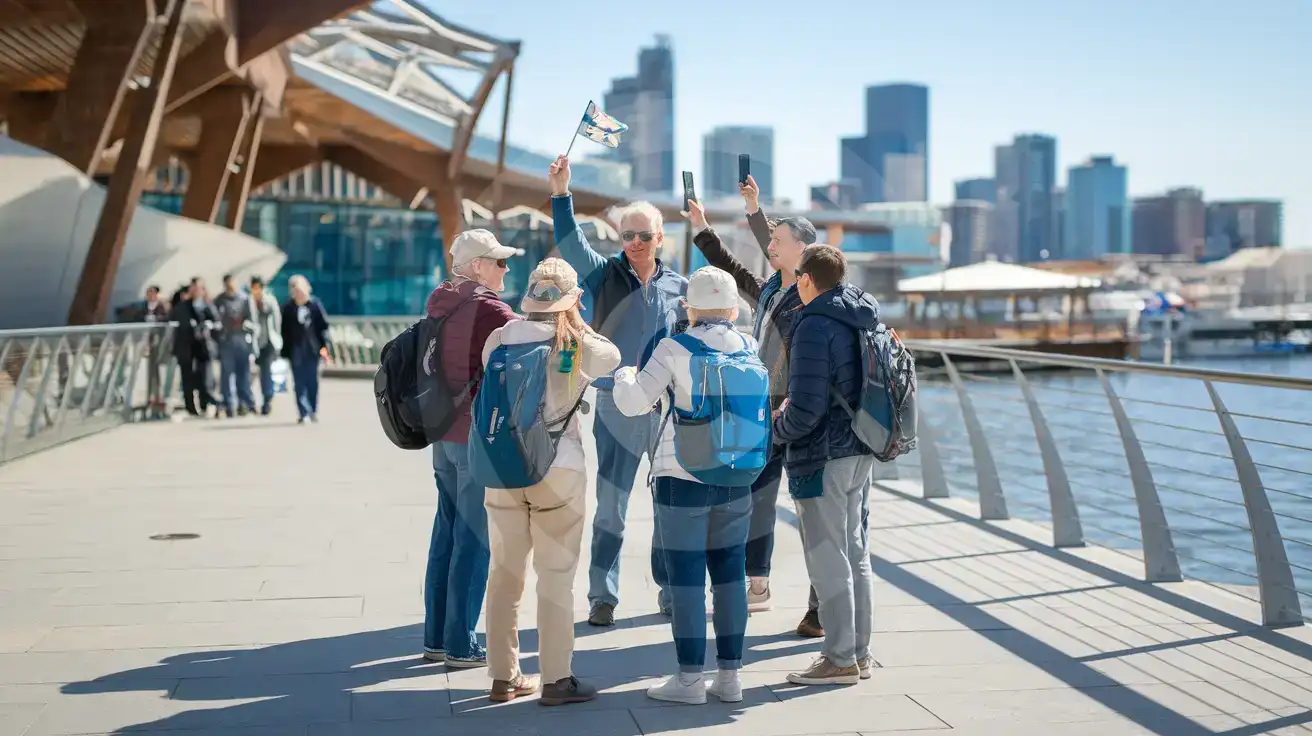
Waterfront Tour Moment

Guided tour group filming along the Seattle Aquarium promenade at Seattle Waterfront in Seattle
At Seattle Waterfront, Seattle, Washington, United States, have your eSIM ready before arrival so ferry times and meeting points load fast.

Compare eSIM Options at Seattle Waterfront

Recommended
Local SIM / Operator
Roaming
Setup timeStore visit + paperworkAuto
No local ID neededSSN/Credit checkUse home account
SpeedCarrier-gradePartner-dependent
Travel supportEnglish onlyHome carrier hours
Keep home numberReplaces itSame number
Cost predictabilityBills can spikeBill-shock risk
5GB / 30 daysLight traveler
15GB / 30 days
₺2106.38 TL
~$45.00/mo + taxes & fees.
$12-18 / day
₺702.13 TL
Typical day-pass tariff varies by home carrier
10GB / 30 daysStandard travelerMost popular
20GB / 30 daysHeavy traveler

Frequently Asked Questions (FAQs)

Activate it after landing in Seattle, not while you are still in the air. By the time you are leaving Sea-Tac for Alaskan Way or checking directions toward the Seattle Great Wheel, your phone can already be pulling live routes and ticket emails.
Yes — that is the point of buying a US plan instead of solving data just for one pier area. If your day continues from the waterfront to Pike Place Market, Capitol Hill, or another city in the country, the same data plan keeps working.
For a light day of Google Maps, ferry checks, messages, and a few ride bookings around Alaskan Way, 1 GB can be enough. If you plan to upload lots of photos, stream video near the Seattle Aquarium, or video-call while moving between piers, give yourself extra headroom.
Yes, it helps a lot. Washington State Ferries schedules, harbor cruise confirmations, rideshare pickup updates, and restaurant reservation messages around the waterfront all work better with live data than with a saved screenshot alone.
Yes. Your home SIM can stay active for incoming voice calls while your data runs through eSIMno, which is useful when your group is splitting between Pier 57, the aquarium side, and the uphill walk toward downtown. For outbound calls, use data-based apps like WhatsApp or FaceTime.
GET A FULL20%OFFon your first order
Use code: FIRSTWELCOME20

Stay connected,
wherever you go

Seamless global eSIM coverage

Get Started
The Seattle Waterfront is one of those places where mobile data matters immediately, not later. Between the ferry terminals, the promenade, the aquarium zone, and ride pickups along Alaskan Way, you end up checking live departure boards, loading Google Maps walking directions, and confirming reservations within minutes of arrival. That is why buying your eSIM before departure makes sense: installation happens while you still have reliable home Wi-Fi, then activation happens after landing when your phone reconnects in Seattle. You avoid wasting time looking for a SIM store, and you are online for the first real decisions of the day. This part of Seattle also pushes more real-time phone use than travelers expect. Washington State Ferries schedules shift by sailing, rideshare pickup points can change block by block, and the waterfront walk from Pier 62 toward the Seattle Great Wheel or Pike Place Market involves stairs, elevators, and detours that make live map guidance useful. If you are meeting a tour group, loading a ticket QR, checking restaurant wait times, or sending your location in a group chat, stable data beats relying on venue Wi-Fi or café logins. The value here is speed: your phone works the moment you need it. A Seattle Waterfront eSIM should not stop being useful once you leave the piers. The same plan should keep working if your trip continues to Capitol Hill, Bellevue, a road trip toward Mount Rainier, or another stop entirely in the United States. That is the real advantage of arranging your data before you fly: one setup for arrival, sightseeing, onward travel, and every app you will keep using after the waterfront is behind you.
Back to United States
No more SIM kiosks

No more SIM kiosks

Skip the airport queues. Install your eSIM at home, activate when you land.

no roaming charges

No roaming surprises

Forget the $200 phone bill three weeks after your trip. Plain pricing, no hidden fees.

keep your physical sim

Keep your home number

Dual-SIM means your physical SIM stays active for calls and texts. eSIM handles only data.

easy installation

Setup in 2 minutes

Scan QR code, follow on-screen steps, you're connected. Works on any eSIM-compatible phone.

Pay SafelyVisa CardMaster CardGoogle PayPayPalApple Pay

How does eSIMNo Works?

Experience seamless global connectivity with our personal eSIM service. Enjoy faster speeds, wider coverage, and the convenience of online purchasing.

Buy a Data Plan

Buy a Data Plan

Search for your destination and pick any data plan

Step 1

Install your eSIM

Install your eSIM

Easy installation via qr code

Step 2

Activate Your eSIM

Activate Your eSIM

Only active when you are ready to use data

Step 3

Advantages

24/7 Customer Support

Reach our team via WhatsApp and email during business hours. Quick answers to common questions available anytime through our automated assistant.

Immediate delivery

Your eSIM arrives by email within minutes. Install it before you board your flight.

Worldwide Coverage

One eSIM, 160+ countries. Land anywhere and connect instantly — no SIM swapping, no roaming charges.

Check Compatibility

Check Compatibility

Before buying and installing an eSim, check if your phone supports one

Check if your phone is eSIM compatible

As you feel the need to use eSIM on your phone, the first question that arises is: does your mobile support eSIMs? And do eSIM-compatible devices work in all regions worldwide?

Some phones that support eSIM technology

  • IPhone XS and Later
  • Samsung Galaxy S20 and Later
  • Pixel 4 and Later
  • Xiaomi 12T Pro and Later
All eSIM-Compatible Phones

Frequently Asked Questions (FAQs)

Find helpful information to answer your questions

Will the eSIM affect my phone's battery life?
Running two SIM lines (physical + eSIM) uses slightly more battery than one, since the phone monitors both networks. The difference is usually 5-10% over a full day. To minimize impact, disable the line you're not actively using or turn off cellular data on the inactive line.
What makes eSIMno different from other eSIM services?
eSIMno partners directly with local operators in over 200 countries, eliminating intermediaries. This direct relationship lets us offer competitive pricing, extensive coverage, and faster activation than resellers who route data through third parties.
Can I use my SIM card and eSIM at the same time?
Yes. On dual-SIM devices (most modern iPhones and Android phones), you can run your physical SIM and the eSIM simultaneously. Use your home SIM for calls and SMS, and the eSIM for mobile data. Keep in mind that leaving your home SIM active may trigger roaming charges if you use it for calls or texts abroad.
Can I buy an eSIM for someone else as a gift?
Yes. Purchase the eSIM with your own details, then forward your order confirmation email - or share the "Install eSIM" link from it - with the recipient so they can install it on their own phone (the email contains the QR code and the manual SM-DP+ / activation codes). Make sure their device is eSIM-compatible first - installation usually cannot be reversed once completed.
What is the price range for the United-states eSIM plans?
Prices commence at ₺213.90 TL and vary according to data allowance and plan duration. Larger data plans and longer durations cost more, but the per-GB rate decreases with bigger packages.
Can I use the eSIM on more than one device?
Each eSIM profile is tied to a single device once activated. If you need data on multiple devices (e.g., phone and tablet), you can either purchase separate eSIMs for each device or use the Personal Hotspot feature on your phone to share data with other devices.
Do I need to deactivate my original SIM?
We recommend turning off cellular data and data roaming on your original SIM while abroad to avoid accidental roaming charges. You don't need to physically remove the SIM - just disable data and set the eSIM as your primary data line.
Can I extend my eSIM plan validity?
The validity of a package that is already running cannot be extended, but you can top up: a top-up adds a new package with its own data AND its own validity days. Packages run one at a time - the top-up waits in queue and activates automatically when your current package ends (data used up or days expired), and its own days start counting from that moment. In practice this keeps you connected longer, even though the current package's own end date does not move.
What happens if I pause my trip and return home?
Your eSIM keeps its validity period running whether you're using it or not - pausing your trip doesn't pause the timer. If you return home, the eSIM stays dormant on your device until you travel again or it expires. You can disable it in cellular settings to avoid accidental usage.
When should I set up my eSIM?
A Wi-Fi connection is required to install your eSIM, so we recommend setting it up before you leave home. Activation can happen later, either right before departure or after you land at your destination - but the initial QR scan needs Wi-Fi.
Will the eSIM work on my iPad?
Yes, if your iPad model supports eSIM. iPad Pro (3rd generation and later), iPad Air (3rd generation and later), iPad mini (5th generation and later), and standard iPad (7th generation and later with cellular) all support eSIM. Installation works the same way as on iPhone.
Can I use the eSIM right after purchase or do I need to wait?
Yes - you can install it immediately after purchase. Your order email arrives within minutes and contains the QR code, a one-tap install link and the manual codes, plus an "Install eSIM" button; you can also sign in > My eSIMs > Install any time. Installing right away does not start your plan - the validity countdown only begins when the eSIM connects to a mobile network inside your plan's coverage area. Keep the eSIM line and Data Roaming off until you are ready to start; if your plan covers the country you are in right now, turning the line on starts the countdown immediately.

Use Your Free Credit

You can earn up to 15% commission from your friends' purchases with your Reference code. Plus, your friends will get $2 off their first purchase when they use your code!

FIND OUT HOW
Refer a friend

Refer

A FRIEND

Step into the world of E-SIM, bring your friends and benefit together!