


Review Your Cart

Your cart is empty.

You haven't added any eSIM packages yet. Start exploring our plans to get connected!

Browse our eSIM Packages
🎉 Welcome offer: 20% off with promo code FIRSTWELCOME20

Mexico Mexico   / Mexico City International Airport

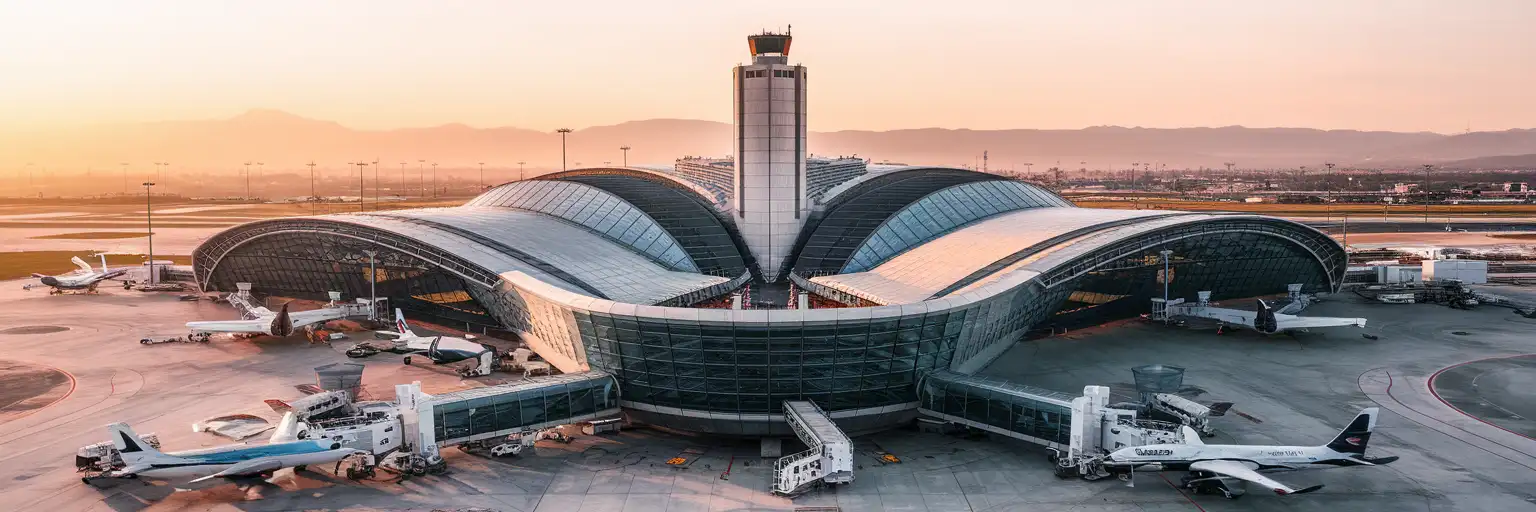
Terminal 2 curved glass facade at Mexico City International Airport with control tower and aircraft at golden hour

Mexico City Airport eSIM: MEX Data That Works Across All of Mexico

Your flight is taxiing toward the gate at Benito Juárez International Airport and you're already confirming your Roma Norte hotel transfer, checking Metrobús schedules to Bellas Artes, and pulling up tonight's dinner reservation in Condesa. With eSIMno, your phone connects the moment you switch off airplane mode — no SIM kiosk queue in Sala A, no passport photocopy, no pesos needed.
View Plans
GET A FULL20%OFFon your first order
Use code: FIRSTWELCOME20

Stay connected,
wherever you go

Seamless global eSIM coverage

Explore our plans below

Plan Your Trip

Tell us what you'll do and how long you'll be away — we'll highlight the right plan.

7 days
1102030

What will you do?

Tap an activity above to see which plan fits your trip

Already a customer?

EARN UP TOON EVERY FRIEND'S PURCHASE
NETWORK: Movistar The speed may vary depending on the location.

Quick Facts

Time Zone
Central Standard Time (UTC-6)
Dialing Code
+52
Currency
Mexican Peso (MXN, $)
Power Plug
Type A, B (flat 2-pin, common across North America)
Language
Spanish (Español)
Emergency
911 (general)
eSIMno Networks
Movistar

How to Get Your eSIM

  1. Pick Your Mexico Data Plan
    Choose from 1GB to 20GB options based on your trip length. A week exploring CDMX museums, markets, and day trips to Teotihuacan runs comfortably on 5-10GB.
  2. Install at Home Before Your Flight
    Scan the QR code over your home WiFi before heading to the airport. The profile loads in under 2 minutes and sits dormant until you activate it.
  3. Board Your Flight to MEX
    Keep airplane mode on during the flight. Your eSIM is ready and waiting — no action needed until you land at Benito Juárez.
  4. Activate After Touchdown
    Once the captain clears phone use and you taxi toward T1 or T2, switch off airplane mode and enable the eSIM line. Movistar connects within seconds.
  5. Request Your Rideshare From the Gate Area
    Open Uber or DiDi while still inside the terminal. By the time you clear customs and reach the designated pickup zone at Puerta 6 (T1) or Puerta 3 (T2), your driver is already waiting.

Traveler Tips

  • Inter-terminal transfers on the Aerotrén require a same-day boarding pass — without one, budget 15-20 minutes for the landside taxi between T1 and T2.
  • Uber and DiDi pickups at MEX are at designated zones: T1 upper level (Salidas) near Puerta 7-8, T2 second level near Puerta 3. Have the app open with your pin dropped before you exit.
  • Currency exchange rates at the airport are noticeably worse than downtown — use your phone to find a Citibanamex or BBVA ATM in Roma or Condesa instead.
  • Metrobús Línea 4 runs from both terminals to Bellas Artes and Buenavista but requires a rechargeable Tarjeta CDMX — buy and top up at the station kiosk using cash.
  • Keep your home SIM active for incoming calls; use WhatsApp or FaceTime over your eSIM data for outgoing calls to avoid roaming charges.
  • Download offline maps of CDMX before departure — Google Maps lets you cache specific neighborhoods, useful if you're navigating Centro Histórico's narrow streets.

Why You Need an eSIM at MEX

Mexico City International Airport — Aeropuerto Internacional Benito Juárez — funnels over 45 million passengers through two terminals annually, and the arrival flow demands data from the moment you clear immigration. The free airport WiFi requires registration that frustrates jet-lagged arrivals, and the SIM kiosk queue in Sala A adds 15-25 minutes to your exit time. An eSIM activated before departure bypasses both.

The Arrival Scramble

International arrivals clear customs through Sala A (T1) or the T2 international hall, where lines commonly stretch 30-60 minutes during mid-morning and late-evening peak banks. While you're waiting, you need data for three things: messaging your hotel transfer driver with your customs progress, checking the Uber app for surge pricing at your terminal, and pulling up your Airbnb check-in instructions. The authorized taxi kiosks (Sitio 300, Porto Taxi) take cash — but confirming the fixed-zone fare on your phone before approaching the counter keeps you from overpaying.

Terminal Navigation and Gate Updates

MEX's two terminals sit 3 km apart across the runways. The Aerotrén people mover connects them in 4-5 minutes, but only for passengers with a same-day boarding pass. Without one, you're stuck with the landside taxi option — and real-time traffic data (Google Maps, Waze) tells you whether that 3 km is a 10-minute ride or a 25-minute crawl. If you're connecting through MEX, the Aeroméxico app pushes gate-change alerts faster than the terminal boards update, and eSIMno plans for Mexico City International Airport keep that notification pipeline open.

Beyond the Terminal

Your MEX eSIM keeps working across all of Mexico. Navigate the Metrobús Línea 4 to the Zócalo (40-60 minutes, requires Tarjeta CDMX tap card), book a day trip to Teotihuacan through GetYourGuide, or call an Uber from your Polanco hotel to Mercado Roma. The same plan covers Oaxaca, Guadalajara, Cancún, and anywhere else your trip takes you — no second card, no top-up hassle.

Visiting Benito Juárez Airport

AICM operates 24 hours, though most retail and dining closes between 22:00 and 23:00. Overnight arrivals find Starbucks (T2) and Sanborns (T1) among the few outlets open past midnight. The Hilton Aeropuerto connects directly to T1 via walkway; the Hilton Garden Inn sits at T2 for early departures or long layovers.

Transit Options to the City

Metro Line 5 (yellow) serves T1 only — Terminal Aérea station is a 5-minute walk from domestic arrivals, but turnstiles and crowded cars make large luggage impractical. Metrobús Línea 4 runs from both terminals to the historic center; the airport fare is 30 MXN payable only by Tarjeta CDMX. Authorized taxi kiosks inside both terminals offer fixed-zone pricing — expect around 250-350 MXN to Roma/Condesa, 350-500 MXN to Polanco or Santa Fe. Uber and DiDi are legal; pickup zones are clearly marked at the upper (Salidas) level.

Connection Timing

Minimum connection times at MEX: 90 minutes same-terminal domestic, 2 hours T1↔T2 domestic, 3 hours for any international leg with a terminal change. Every international passenger clears Mexican immigration and customs on arrival — there is no sterile transit zone.

Connected at MEX

Mixed couple walking through Terminal 2 concourse at Mexico City International Airport with smartphone in hand
Activate your eSIM before boarding so your rideshare request goes out while you're still clearing customs at MEX.

Compare eSIM Options at Mexico City International Airport

Recommended
Local SIM / Operator
Roaming
Setup timeStore visit + paperworkAuto
No local ID neededLocal ID requiredUse home account
SpeedCarrier-gradePartner-dependent
Travel supportSpanish onlyHome carrier hours
Keep home numberReplaces itSame number
Cost predictabilityBills can spikeBill-shock risk
Typical pricing
$12-18 / day
Typical day-pass tariff varies by home carrier

PRICING — PICK YOUR ESIMNO PLAN

Light traveler
5GB / 30d
$30.90
20% off with code FIRSTWELCOME20on your first order
≈ $24.72 USD with code
Buy now
Heavy traveler
20GB / 30d
$89.90
20% off with code FIRSTWELCOME20on your first order
≈ $71.92 USD with code
Buy now

Frequently Asked Questions (FAQs)

Install the eSIM profile at home over WiFi before your flight, then activate it after your plane taxis to the gate at MEX. By the time you're walking through the Sala A customs corridor, your phone is already pulling Uber directions to Roma Norte.

Yes — your eSIMno plan covers the entire country. The same data that connects you at Benito Juárez keeps working in Oaxaca markets, on Cancún beaches, and everywhere between. No second card or top-up needed.

Metrobús Línea 4 runs from both terminals to Bellas Artes and the Zócalo area — the trip takes 40-60 minutes and requires a rechargeable Tarjeta CDMX. Uber and DiDi pickups are at designated zones: T1 upper level near Puerta 7-8, T2 second level near Puerta 3. Having data ready means your driver is already en route while you're still at baggage claim.

Your home SIM stays active for incoming calls — no setup needed since dual-SIM mode keeps both lines live. For outgoing calls, use WhatsApp, FaceTime, or Google Meet over your eSIM data to avoid home-network roaming charges.

A week exploring CDMX — navigating the Metro, calling rideshares from Coyoacán, booking Teotihuacan day trips, and sharing photos from Chapultepec — runs comfortably on 5-10GB. Heavy video callers or remote workers should consider the 15-20GB plans.

The airport WiFi requires registration that adds friction when you're jet-lagged and trying to message your hotel transfer. Coverage varies across terminals, and peak arrival banks crowd the network. An eSIM bypasses all of it — you're connected the moment airplane mode switches off.

GET A FULL20%OFFon your first order
Use code: FIRSTWELCOME20

Stay connected,
wherever you go

Seamless global eSIM coverage

Get Started
Mexico City International Airport handles over 45 million passengers annually across two terminals separated by runways and connected by the Aerotrén people mover. The arrival flow through Sala A international customs can stretch 30-60 minutes during peak banks, and the authorized taxi kiosks and Uber pickup zones require live app access the moment you clear baggage claim. An eSIM activated before departure means your rideshare request goes out while you're still walking toward Puerta 6, not while you're hunting for unreliable terminal WiFi. Terminal 1 serves most international carriers plus VivaAerobus domestic routes, while Terminal 2 hosts Aeroméxico and its SkyTeam partners. Inter-terminal transfers need a same-day boarding pass for the Aerotrén — without one, you're looking at a taxi ride of 10-20 minutes between T1 and T2. Real-time gate updates on the Aeroméxico app or Google Flights keep you ahead of last-minute changes, and group chat with whoever is picking you up saves the confusion of finding each other at arrivals level. Your MEX eSIM keeps working as you head into proper — whether you're navigating the Metrobús Línea 4 toward the Zócalo, calling an Uber from Polanco, or booking a day trip to through Viator. The same plan covers Oaxaca markets, Guadalajara business meetings, and Cancún beaches without swapping cards or buying a second plan. Activate before takeoff, land connected, and skip the connectivity scramble entirely.
Back to Mexico
No more SIM kiosks

No more SIM kiosks

Skip the airport queues. Install your eSIM at home, activate when you land.

no roaming charges

No roaming surprises

Forget the $200 phone bill three weeks after your trip. Plain pricing, no hidden fees.

keep your physical sim

Keep your home number

Dual-SIM means your physical SIM stays active for calls and texts. eSIM handles only data.

easy installation

Setup in 2 minutes

Scan QR code, follow on-screen steps, you're connected. Works on any eSIM-compatible phone.

Pay SafelyVisa CardMaster CardGoogle PayPayPalApple Pay

How does eSIMNo Works?

Experience seamless global connectivity with our personal eSIM service. Enjoy faster speeds, wider coverage, and the convenience of online purchasing.

Buy a Data Plan

Buy a Data Plan

Search for your destination and pick any data plan

Step 1

Install your eSIM

Install your eSIM

Easy installation via qr code

Step 2

Activate Your eSIM

Activate Your eSIM

Only active when you are ready to use data

Step 3

Advantages

24/7 Customer Support

Reach our team via WhatsApp and email during business hours. Quick answers to common questions available anytime through our automated assistant.

Immediate delivery

Your eSIM arrives by email within minutes. Install it before you board your flight.

Worldwide Coverage

One eSIM, 160+ countries. Land anywhere and connect instantly — no SIM swapping, no roaming charges.

Check Compatibility

Check Compatibility

Before buying and installing an eSim, check if your phone supports one

Check if your phone is eSIM compatible

As you feel the need to use eSIM on your phone, the first question that arises is: does your mobile support eSIMs? And do eSIM-compatible devices work in all regions worldwide?

Some phones that support eSIM technology

  • IPhone XS and Later
  • Samsung Galaxy S20 and Later
  • Pixel 4 and Later
  • Xiaomi 12T Pro and Later
All eSIM-Compatible Phones

Frequently Asked Questions (FAQs)

Find helpful information to answer your questions

How long is the validity of the Mexico eSIM plans?
The validity of eSIM plans varies from 7 days to 90 days depending on the plan you choose. Lifetime options are also available for travelers who don't want their data to expire after a fixed period.
Do I need to deactivate my original SIM?
We recommend turning off cellular data and data roaming on your original SIM while abroad to avoid accidental roaming charges. You don't need to physically remove the SIM - just disable data and set the eSIM as your primary data line.
Can I tether or use Personal Hotspot with my eSIM?
Yes. Your eSIMno plan supports tethering and Personal Hotspot at no extra charge. Activate the Personal Hotspot feature in your device settings and connect other devices as you would with any cellular plan. Data used while tethering counts toward your plan allowance.
How fast does the eSIM activate after I switch off airplane mode?
Activation typically takes 10-30 seconds after airplane mode is switched off, depending on local network availability. In some cases it's nearly instant; in remote areas it may take a minute or two. If it doesn't connect within 5 minutes, restart your phone or check that data roaming is enabled.
What smartphones support eSIM?
Most modern devices support eSIM, including iPhone XS and later, Samsung Galaxy S20 through S25 series, Google Pixel 4 and later, Huawei P40 and later, and many recent iPads. Check our full compatibility list before purchasing to confirm your device is supported.
How do I top up my Mexico eSIM?
To top up your Mexico eSIM data, log in to the 'My eSIMs' section in the eSIMno Center on our website or mobile app. Select the eSIM you want to top up and follow the on-screen instructions to add more data without losing your current connection.
What happens when my data plan runs out?
When you use up your data allowance, your connection stops until you top up or purchase a new plan. You can top up directly from the eSIMno Center while connected to Wi-Fi, or buy a new plan if your validity period has expired.
Is the eSIM connection secure?
eSIM connections are as secure as standard cellular connections - encrypted by the carrier network. For added security on public networks (cafes, airports), use a VPN. The eSIM profile itself is digitally signed and can't be cloned like a physical SIM.
How do I activate the Mexico eSIM?
Your eSIMno order confirmation email contains your QR code, your SM-DP+ address and activation code, a one-tap install link, and an "Install eSIM" button - so you can install right from the email. The same options are also on the website: sign in at esimno.com and go to Profile > My eSIMs > your plan > Install. To install, use any ONE of these methods: (1) on the phone you are setting up, tap the one-tap install link/button (iPhone on iOS 17.4+ or Android 9+); (2) use the QR code - because a phone cannot scan its own screen, show this QR on another screen (computer/tablet) or a printout and scan it WITH the phone you are setting up (never with someone else's phone, or the eSIM would install on that phone); or (3) enter the SM-DP+ address and activation code manually. Your Mexico eSIM activates automatically when you connect to a local network at your destination.
What is the price range for the Mexico eSIM plans?
Prices commence at $10.90 and vary according to data allowance and plan duration. Larger data plans and longer durations cost more, but the per-GB rate decreases with bigger packages.
Can I install my eSIM before traveling?
Yes - setting it up before your trip is the easiest approach. Your confirmation email contains the QR code, a one-tap install link and the manual SM-DP+ / activation codes (the same options are also available via sign in > Profile > My eSIMs > Install). While on Wi-Fi at home, install it with the one-tap link on your phone, or - to use the QR - show it on another screen or a printout and scan it with the phone you are setting up (not another phone). Installing does not start your plan: the validity countdown only begins when the eSIM connects to a mobile network inside your plan's coverage area. Keep the eSIM line and its Data Roaming off until you are ready to start - if your plan covers the country you are in right now, turning the line on connects and starts the countdown immediately, even if you do not browse anything. Please note: once installed, an eSIM is considered used and is no longer eligible for a refund.
What network speeds can I expect?
Most eSIMno plans connect at 4G/LTE or 5G speeds depending on local network availability and your device's capabilities. Speed varies by location, network congestion, and signal strength. In major cities and tourist areas, expect speeds comparable to local mobile carriers.

Use Your Free Credit

You can earn up to 15% commission from your friends' purchases with your Reference code. Plus, your friends will get $2 off their first purchase when they use your code!

FIND OUT HOW
Refer a friend

Refer

A FRIEND

Step into the world of E-SIM, bring your friends and benefit together!