


Review Your Cart

Your cart is empty.

You haven't added any eSIM packages yet. Start exploring our plans to get connected!

Browse our eSIM Packages
🎉 Welcome offer: 20% off with promo code FIRSTWELCOME20

Japan Japan   / Tokyo Skytree

Tokyo Skytree tower rising above the Sumida cityscape at golden hour with the Solamachi complex at its base

Tokyo Skytree eSIM: Observation Deck Data That Works Across All Japan

You're riding the elevator toward the Tembo Deck at 350 meters with your timed-entry confirmation still loading, photos of the cityscape ready to share, and transit directions back to Tokyo Station open on your phone. With eSIMno, your Japan data works the moment you step off the Tobu Skytree Line — no kiosk queue at Oshiage, no fumbling with plastic SIM trays while the elevator doors close.
View Plans
GET A FULL20%OFFon your first order
Use code: FIRSTWELCOME20

Stay connected,
wherever you go

Seamless global eSIM coverage

Explore our plans below

Plan Your Trip

Tell us what you'll do and how long you'll be away — we'll highlight the right plan.

7 days
1102030

What will you do?

Tap an activity above to see which plan fits your trip

Already a customer?

EARN UP TOON EVERY FRIEND'S PURCHASE
NETWORK: KDDI The speed may vary depending on the location.

Quick Facts

Language
Japanese (日本語)
Currency
Japanese Yen (JPY, ¥)
Time Zone
Tokyo Standard Time (UTC+9)
Dialing Code
+81
Power Plug
Type A (flat 2-pin, common in Japan and North America; voltage is 100V in Japan, lower than the 110-120V of the US)
Emergency
110 (police), 119 (fire / ambulance)
eSIMno Networks
KDDI

How to Get Your eSIM

  1. Pick Your Japan Plan
    Choose the data volume that fits your Skytree visit and onward travel — 3GB handles a weekend trip, 10GB+ suits a full week across Tokyo, Kyoto, and Osaka.
  2. Install Over WiFi Before You Fly
    Scan the QR code at home or your hotel before departure. The profile sits dormant until you activate — no data charges until you're in Japan.
  3. Activate After Landing
    Once your flight taxis to the gate at Haneda or Narita, switch off airplane mode. Your phone connects to KDDI within seconds.
  4. Pull Up Your Skytree Ticket
    By the time you exit Oshiage Station and walk toward the fourth-floor entrance, your timed-entry confirmation loads instantly — no searching for lobby WiFi.
  5. Use Everywhere in Japan
    The same plan that works at 450 meters on the Tembo Galleria keeps working at sea level in Asakusa, across Shibuya Crossing, or inside the Shinkansen to Kyoto.

Traveler Tips

  • Arrive at 10:00 opening or after 20:00 for shorter elevator queues — midday weekends can hit 45-minute waits for the Tembo Deck.
  • Winter mornings from December to February offer the clearest Mount Fuji visibility from the 350-meter deck — check the forecast app before booking your slot.
  • Keep your home SIM active for incoming calls; use your eSIMno data for WhatsApp, FaceTime, and LINE calls to avoid roaming voice charges.
  • Download offline maps for Sumida ward before visiting — the Solamachi basement levels have weaker signal than the observation decks.
  • The Glass Floor section on Floor 340 is a photo hotspot; upload to social while you wait rather than fighting the crowd for WiFi afterward.

Why Data Matters at Tokyo Skytree

The Skytree experience runs on data from the moment you leave Oshiage Station. Your timed-entry ticket lives in an email or the official reservation confirmation — pull it up at the fourth-floor gate or risk scrambling for the Solamachi lobby WiFi with a hundred other visitors. The elevator ride to Floor 350 takes about 50 seconds, but the queue to board can stretch 30 minutes on busy weekends; real-time wait updates on the Skytree app save standing in the wrong line.

At the Tembo Deck, KDDI signal holds strong across all three floors. The photo opportunity at the Glass Floor section on 340 and the panoramic windows on 350 both demand instant sharing — Instagram, LINE, WhatsApp — while the view is fresh. The upper Tembo Galleria at 450 meters has the same coverage, but the spiral glass-walled air walk creates reflection glare; editing apps like Snapseed or Lightroom Mobile let you fix the shot before descending.

After the observation deck, the data demand shifts to transit. Google Maps or Navitime Japan navigate the Tobu Skytree Line back toward Asakusa (one stop, 2 minutes) or the Hanzomon metro toward Shibuya (direct, 25 minutes). The 15-minute walk across the Sumida River to Senso-ji needs live directions unless you've memorized the Kototoi Bridge route. A rideshare pickup along the Solamachi taxi lane requires DiDi or Uber Japan — both need data to confirm driver ETA. eSIMno plans for Tokyo Skytree, Tokyo, Japan keep every transition seamless from 634 meters down to street level.

Visiting Tokyo Skytree

The observation decks open daily from 10:00 to 22:00, with last admission around 21:00. Elevator service to the upper Tembo Galleria suspends during high winds — check the official site before booking a combined ticket. Foreign passport holders can use the Fast Skytree Ticket counter on the fourth floor for priority boarding at a small premium over standard rates.

Dress comfortably for temperature differences; the upper deck at 450 meters can feel several degrees cooler than the Sumida streets below. Photography is unrestricted, though tripods longer than 50 centimeters and flash toward the windows are prohibited. The Solamachi complex at the tower's base holds restaurants, the Sumida Aquarium, and the Konica Minolta Planetarium — each has its own ticket flow, so plan data for multiple QR scans if you're combining visits.

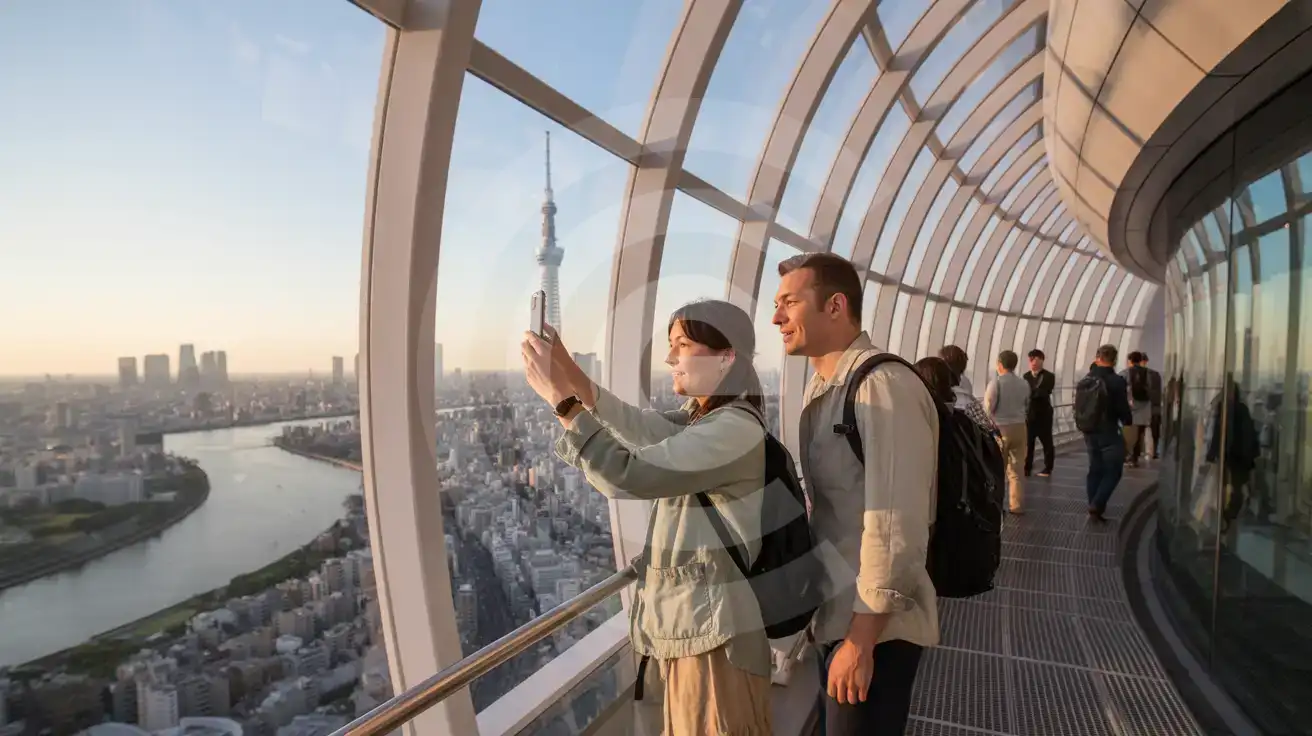
View From the Tembo Galleria

Couple photographing Tokyo cityscape from the Tembo Galleria spiral observation corridor at 450 meters inside Tokyo Skytree
Activate your Japan eSIM before the elevator ride — your photos upload while the view is still fresh.

Compare eSIM Options at Tokyo Skytree

Recommended
Local SIM / Operator
Roaming
Setup timeStore visit + paperworkAuto
No local ID neededLocal ID requiredUse home account
SpeedCarrier-gradePartner-dependent
Travel supportJapanese onlyHome carrier hours
Keep home numberReplaces itSame number
Cost predictabilityBills can spikeBill-shock risk
Typical pricing
Cheap but Japanese support only
$12-18 / day
Typical day-pass tariff varies by home carrier

PRICING — PICK YOUR ESIMNO PLAN

Light traveler
5GB / 30d
$24.90
20% off with code FIRSTWELCOME20on your first order
≈ $19.92 USD with code
Buy now
Heavy traveler
20GB / 30d
$53.90
20% off with code FIRSTWELCOME20on your first order
≈ $43.12 USD with code
Buy now

Frequently Asked Questions (FAQs)

Activate after your flight lands at Haneda or Narita. By the time you clear immigration and board the Keisei Skyliner or Keikyu line toward central Tokyo, your phone is already pulling transit directions. The Oshiage Station exit to Skytree is a 2-minute walk — your timed-entry confirmation loads before you reach the fourth-floor gate.

KDDI coverage reaches both the Tembo Deck at 350 meters and the Tembo Galleria at 450 meters. The glass-walled air walk and the Glass Floor section on Floor 340 all hold signal — you can upload photos and check transit options from any level without hunting for the Solamachi WiFi.

Your home SIM stays active for incoming calls in dual-SIM mode — no setup needed. For outgoing calls, use WhatsApp, LINE, or FaceTime over your eSIMno data instead of placing native voice calls, which trigger roaming charges through your home carrier.

The plan covers all of Japan on KDDI. The data that works at 634 meters above Sumida keeps working on the Shinkansen to Kyoto, inside Fushimi Inari's torii gates, across Osaka's Dotonbori, and anywhere else you travel — no second purchase needed.

Arrive at 10:00 opening or after 20:00 for shorter queues. For Mount Fuji visibility, winter mornings from December to February offer the clearest sightlines. Sunset visits are popular but crowded — arriving 90 minutes before dusk lets you see both daylight and night views in one trip.

From Haneda, take the Keikyu line to Asakusa (40 minutes), then walk 15 minutes or transfer to the Tobu Skytree Line for one stop. From Narita, the Keisei Access Express runs directly to Oshiage Station (55 minutes) — the station sits directly beneath the tower. Real-time apps like Navitime Japan or Google Maps navigate the transfers.

GET A FULL20%OFFon your first order
Use code: FIRSTWELCOME20

Stay connected,
wherever you go

Seamless global eSIM coverage

Get Started
Tokyo Skytree draws visitors for the panoramic views from 350 and 450 meters, but the experience starts the moment you exit Oshiage Station. Your phone needs to pull up the timed-entry QR code, check the current visibility forecast for Mount Fuji sightings, and coordinate the return route before you even reach the fourth-floor ticket counter. Having data ready from touchdown at Haneda or Narita means the Skytree visit flows without friction. The Tembo Deck and Tembo Galleria both have strong cellular coverage through KDDI, but the real data demand hits after the observation deck — coordinating a rideshare pickup along the Solamachi drop-off lane, messaging friends about dinner timing in Asakusa, or loading Google Maps for the 15-minute walk across the Sumida River to Senso-ji. A Japan eSIM that activates before departure handles every transition. Skytree sits at the intersection of eastern Tokyo transit lines — the Tobu Skytree Line, the Hanzomon metro, the Toei Asakusa line, and the Keisei route toward Narita. Each platform has its own signage and fare gates. Real-time transit apps like Google Maps and Navitime Japan turn the multi-line transfer into a single tap. eSIMno plans for Japan keep that lookup instant from Skytree to Shibuya to Shinjuku and beyond.
Back to Japan
No more SIM kiosks

No more SIM kiosks

Skip the airport queues. Install your eSIM at home, activate when you land.

no roaming charges

No roaming surprises

Forget the $200 phone bill three weeks after your trip. Plain pricing, no hidden fees.

keep your physical sim

Keep your home number

Dual-SIM means your physical SIM stays active for calls and texts. eSIM handles only data.

easy installation

Setup in 2 minutes

Scan QR code, follow on-screen steps, you're connected. Works on any eSIM-compatible phone.

Pay SafelyVisa CardMaster CardGoogle PayPayPalApple Pay

How does eSIMNo Works?

Experience seamless global connectivity with our personal eSIM service. Enjoy faster speeds, wider coverage, and the convenience of online purchasing.

Buy a Data Plan

Buy a Data Plan

Search for your destination and pick any data plan

Step 1

Install your eSIM

Install your eSIM

Easy installation via qr code

Step 2

Activate Your eSIM

Activate Your eSIM

Only active when you are ready to use data

Step 3

Advantages

24/7 Customer Support

Reach our team via WhatsApp and email during business hours. Quick answers to common questions available anytime through our automated assistant.

Immediate delivery

Your eSIM arrives by email within minutes. Install it before you board your flight.

Worldwide Coverage

One eSIM, 160+ countries. Land anywhere and connect instantly — no SIM swapping, no roaming charges.

Check Compatibility

Check Compatibility

Before buying and installing an eSim, check if your phone supports one

Check if your phone is eSIM compatible

As you feel the need to use eSIM on your phone, the first question that arises is: does your mobile support eSIMs? And do eSIM-compatible devices work in all regions worldwide?

Some phones that support eSIM technology

  • IPhone XS and Later
  • Samsung Galaxy S20 and Later
  • Pixel 4 and Later
  • Xiaomi 12T Pro and Later
All eSIM-Compatible Phones

Frequently Asked Questions (FAQs)

Find helpful information to answer your questions

What should I do if I see a 'No network' message after activating my eSIM?
If you see a 'No network' message after activation, try these steps in order: (1) Toggle airplane mode on for 10 seconds, then off. (2) Confirm data roaming is enabled for the eSIM line. (3) Manually select a network in cellular settings. (4) Restart your phone. If the issue continues, contact eSIMno support via WhatsApp or email.
Will the eSIM work on my iPad?
Yes, if your iPad model supports eSIM. iPad Pro (3rd generation and later), iPad Air (3rd generation and later), iPad mini (5th generation and later), and standard iPad (7th generation and later with cellular) all support eSIM. Installation works the same way as on iPhone.
How fast does the eSIM activate after I switch off airplane mode?
Activation typically takes 10-30 seconds after airplane mode is switched off, depending on local network availability. In some cases it's nearly instant; in remote areas it may take a minute or two. If it doesn't connect within 5 minutes, restart your phone or check that data roaming is enabled.
Can I extend my eSIM plan validity?
The validity of a package that is already running cannot be extended, but you can top up: a top-up adds a new package with its own data AND its own validity days. Packages run one at a time - the top-up waits in queue and activates automatically when your current package ends (data used up or days expired), and its own days start counting from that moment. In practice this keeps you connected longer, even though the current package's own end date does not move.
Can I share data from my eSIM with someone else's phone?
Yes, through Personal Hotspot. Activate hotspot on your phone, share the password, and the other device connects to your data. Data used by connected devices counts toward your eSIM plan, so monitor usage to avoid running out faster than expected.
Can I use the eSIM right after purchase or do I need to wait?
Yes - you can install it immediately after purchase. Your order email arrives within minutes and contains the QR code, a one-tap install link and the manual codes, plus an "Install eSIM" button; you can also sign in > My eSIMs > Install any time. Installing right away does not start your plan - the validity countdown only begins when the eSIM connects to a mobile network inside your plan's coverage area. Keep the eSIM line and Data Roaming off until you are ready to start; if your plan covers the country you are in right now, turning the line on starts the countdown immediately.
Can I keep my WhatsApp number while using an eSIM?
Yes. Your WhatsApp number stays linked to your home SIM, so all your chats, contacts, and groups remain unchanged. WhatsApp uses data (not the SIM line directly) for messages and calls, so it works seamlessly over your eSIMno data.
How do I top up my Japan eSIM?
To top up your Japan eSIM data, log in to the 'My eSIMs' section in the eSIMno Center on our website or mobile app. Select the eSIM you want to top up and follow the on-screen instructions to add more data without losing your current connection.
What should I do if I lose my activation QR code?
You can't really lose it - your QR code is in your order confirmation email, and also in the install pop-up on the website. To reopen it any time before activation, tap "Install eSIM" in your order email, or sign in at esimno.com and go to Profile > My eSIMs > Install. Both show the QR code together with the one-tap install link and the manual SM-DP+ / activation code. Note the install codes are one-time-use: once the eSIM is installed on a device they can't be reused - reopen the installer (My eSIMs > Install) to display a fresh QR if you need one.
Can I use the eSIM for my smartwatch?
Some smartwatches (Apple Watch Cellular, Samsung Galaxy Watch LTE) support eSIM, but they typically require a plan from your home carrier rather than a travel eSIM. eSIMno plans are designed for phones and tablets - check device compatibility before purchase if you intend to use a wearable.
Can I make phone calls or send SMS?
eSIMno is a data-only service, so you can't make traditional voice calls or send SMS through the eSIM line. However, you can use messaging and calling apps over data - WhatsApp, iMessage, FaceTime, Telegram, Signal, and Google Meet all work normally.
Can I use my SIM card and eSIM at the same time?
Yes. On dual-SIM devices (most modern iPhones and Android phones), you can run your physical SIM and the eSIM simultaneously. Use your home SIM for calls and SMS, and the eSIM for mobile data. Keep in mind that leaving your home SIM active may trigger roaming charges if you use it for calls or texts abroad.

Use Your Free Credit

You can earn up to 15% commission from your friends' purchases with your Reference code. Plus, your friends will get $2 off their first purchase when they use your code!

FIND OUT HOW
Refer a friend

Refer

A FRIEND

Step into the world of E-SIM, bring your friends and benefit together!