Review Your Cart

Your cart is empty.

You haven't added any eSIM packages yet. Start exploring our plans to get connected!

Browse our eSIM Packages
🎉 Welcome offer: 20% off with promo code FIRSTWELCOME20

United States United States   / Lumen Field

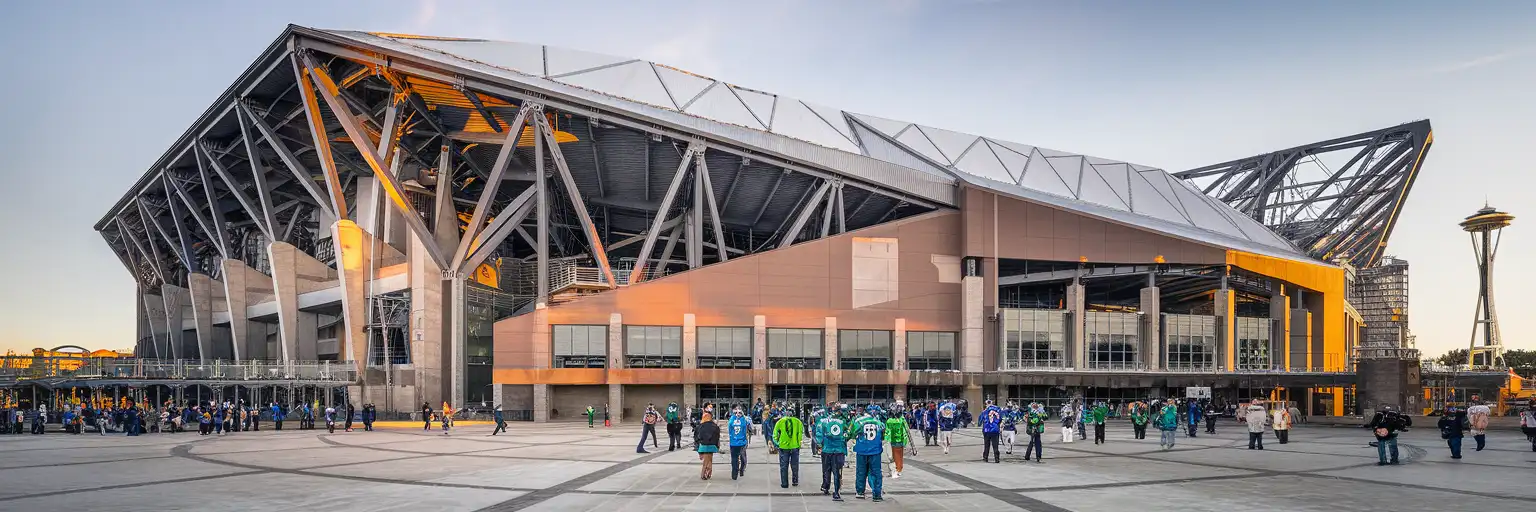
Lumen Field exterior at golden hour with exposed steel trusses and Seattle skyline visible behind the stadium

Lumen Field eSIM: Seattle Game-Day Data That Works Nationwide

The final whistle blows at Lumen Field and 69,000 fans hit their phones at once — rideshare surge pricing, light rail times, and the group chat all competing for bandwidth. eSIMno gets your US data ready before you board, so your phone works the moment you switch off airplane mode after landing at Sea-Tac.
View Plans
GET A FULL20%OFFon your first order
Use code: FIRSTWELCOME20

Stay connected,
wherever you go

Seamless global eSIM coverage

Explore our plans below

Plan Your Trip

Tell us what you'll do and how long you'll be away — we'll highlight the right plan.

7 days
1102030

What will you do?

Tap an activity above to see which plan fits your trip

Already a customer?

EARN UP TOON EVERY FRIEND'S PURCHASE
NETWORK: AT&T & Verizon Wireless The speed may vary depending on the location.

Quick Facts

Time Zone
Pacific Time (UTC-8 / UTC-7 DST)
Dialing Code
+1
Currency
US Dollar (USD, $)
Power Plug
Type A, B (flat 2-pin, common across North America)
Language
English
Emergency
911 (police, fire, ambulance)
eSIMno Networks
AT&T, Verizon Wireless

How to Get Your eSIM

  1. Pick Your US Data Plan
    Choose a plan that covers your full trip — Lumen Field events plus any travel across Seattle, the Pacific Northwest, or beyond. Plans start from a few days up to 30-day options.
  2. Install at Home Before Your Flight
    Scan the QR code over your home WiFi and let the profile download. This takes 2-3 minutes and means zero setup stress after a long flight into Sea-Tac.
  3. Activate After Landing
    Once your plane taxis to the gate at Sea-Tac, switch off airplane mode. Your eSIM connects to AT&T or Verizon automatically — data ready before you reach baggage claim.
  4. Set eSIM as Primary Data Line
    In your phone's cellular settings, assign the eSIM for mobile data. Keep your home SIM active for incoming calls and texts — dual-SIM handles both without manual switching.
  5. Head to Lumen Field With Data Ready
    Link Light Rail from Sea-Tac to Stadium Station takes 38 minutes. Your phone handles the ORCA top-up, the ticket QR at the gate, and the postgame Lyft request — no stadium WiFi hunt required.

Traveler Tips

  • Arrive at Lumen Field 90 minutes before kickoff — the Hawk's Nest and CenturyLink-era south end fill fast, and mobile ticket scans move quicker when you're not rushing.
  • Link Light Rail to Stadium Station runs every 6-10 minutes on game days; check OneBusAway for live arrival times so you skip the platform wait.
  • Postgame rideshare surge pricing peaks 0-20 minutes after the final whistle — walk 10 minutes north toward Pioneer Square and request from there to beat the $15-25 surge premium.
  • Keep your home SIM active for incoming calls while using eSIMno data for maps, tickets, and the group chat — dual-SIM means no manual call routing.
  • Lumen Field's upper deck and outdoor concourses get solid macro-tower coverage from AT&T and Verizon; lower concourse tunnels may dip briefly during crowd surges.
  • Download the Seahawks or Sounders app before the event — mobile tickets, replays, and concession ordering all pull data, and pregame WiFi congestion makes downloads slow.

Why Data Matters at Lumen Field

Lumen Field's 69,000-seat bowl creates predictable data-demand spikes: gate-open ticket scans, halftime social uploads, and the postgame exodus when everyone requests a Lyft at once. Your phone handles mobile ticket QR codes at the turnstile — paper tickets are increasingly rare for Seahawks NFL and Sounders MLS fixtures — and the team apps pull replays, stats, and mobile ordering for concession pickup. Real-time rideshare pricing through Uber or Lyft shows you when surge drops from $25 premium to $8 within 15 minutes of walking north toward Pioneer Square.

Transit coordination matters before and after the match. Link Light Rail runs from Sea-Tac Airport to Stadium Station in 38 minutes ($3.25 ORCA fare), and OneBusAway shows live arrival times so you skip the 12-minute platform wait. King County Metro Route 124 connects to Tukwila for $2.75 if you're staying south of downtown. Postgame, the first train out is packed — real-time tracking lets you time the walk from your seat to the platform and catch the second train with breathing room.

Your eSIMno plans for Lumen Field, Seattle, Washington, United States keep working after the final whistle. Walk to Pioneer Square for postgame drinks (10 minutes south on 1st Avenue), catch the ferry from Washington State Ferries to Bainbridge Island the next morning, or extend your trip to Pike Place Market for a 15-minute walk north through downtown. Same data plan, no roaming toggle, no SIM swap at the airport kiosk.

Visiting Lumen Field

Lumen Field sits in Seattle's SoDo district, a 10-minute walk south of Pioneer Square and directly adjacent to T-Mobile Park (Mariners MLB). The stadium opened in 2002 and hosts Seahawks games August through January, Sounders matches March through October, and major concerts year-round. Gates open 90 minutes before NFL kickoff and 60 minutes before MLS.

Getting There

Stadium Station on Link Light Rail sits at the northwest corner — trains run every 6-10 minutes from downtown Westlake (8 minutes) or Sea-Tac Airport (38 minutes). King Street Station (Amtrak, Sounder commuter rail) is a 5-minute walk north. Rideshare drop-off zones cluster on Occidental Avenue; postgame pickup works better from 1st Avenue South after the initial crowd disperses.

Tickets and Entry

Mobile tickets dominate — screenshot or download to your wallet app before entering. Turnstile QR scans move quickly when your phone has data; WiFi congestion at gate-open slows the backup method. Clear-bag policy for Seahawks games (12×6×12 inches or smaller clutch); Sounders matches are slightly more relaxed. Re-entry is not permitted once you scan in.

Inside Lumen Field on Game Day

Mixed couple cheering at a live Seahawks game inside Lumen Field with packed crowd and players on the field
Activate your eSIM before kickoff so your phone handles tickets, replays, and the postgame Lyft request.

Compare eSIM Options at Lumen Field

Recommended
Local SIM / Operator
Roaming
Setup timeStore visit + paperworkAuto
No local ID neededSSN/Credit checkUse home account
SpeedCarrier-gradePartner-dependent
Travel supportEnglish onlyHome carrier hours
Keep home numberReplaces itSame number
Cost predictabilityBills can spikeBill-shock risk
5GB / 30 daysLight traveler
15GB / 30 days
$45.00
~$45.00/mo + taxes & fees.
$12-18 / day
$15.00
Typical day-pass tariff varies by home carrier
10GB / 30 daysStandard travelerMost popular
20GB / 30 daysHeavy traveler

Frequently Asked Questions (FAQs)

Install the eSIM profile at home over WiFi before your flight, then switch it on after your plane lands at Sea-Tac. By the time you're walking through baggage claim, your phone is already pulling OneBusAway times for the Link Light Rail to Stadium Station.

AT&T and Verizon maintain macro-tower coverage across the stadium bowl and upper concourses. Lower concourse tunnels may dip briefly during halftime and postgame crowd surges, but the open-air seating areas hold signal well — your mobile ticket scan, team app replays, and rideshare requests go through.

Link Light Rail runs directly from Sea-Tac to Stadium Station in 38 minutes. Trains depart every 6-10 minutes; tap your ORCA card or contactless payment at the turnstile. Your eSIMno data handles the real-time arrival check on OneBusAway while you're still in the terminal.

Yes — dual-SIM setup keeps your home SIM active for incoming calls and texts. Assign the eSIM as your primary data line in cellular settings. Outgoing calls work best through WhatsApp, FaceTime, or Google Meet over your eSIM data to avoid home-network roaming charges.

The same plan covers all 50 states. If your trip extends to a ferry to Bainbridge Island, a day trip to Mount Rainier, or a connecting flight through Denver or San Francisco, your data keeps working — no roaming toggle, no SIM swap.

Surge peaks 0-20 minutes after the final whistle. Walk 10 minutes north toward Pioneer Square and request from 1st Avenue — surge typically drops from a $25 premium to under $10 by the time you clear the immediate stadium zone. Real-time pricing on the Uber or Lyft app shows when to request.

GET A FULL20%OFFon your first order
Use code: FIRSTWELCOME20

Stay connected,
wherever you go

Seamless global eSIM coverage

Get Started
Lumen Field hosts Seahawks NFL games, Sounders MLS matches, and stadium-scale concerts where 69,000 phones compete for signal at the same moments — halftime, final whistle, encore. The eSIM you activate before departure bypasses the Sea-Tac SIM kiosk queue entirely and connects through AT&T or Verizon the moment your plane taxis to the gate. From there, Link Light Rail runs directly to Stadium Station in 38 minutes for $3.25, and your phone handles the ORCA card top-up, the ticket QR scan at the turnstile, and the postgame Lyft request without hunting for stadium WiFi. Game-day data demands spike in predictable windows: gate-open crowds checking mobile tickets, halftime social uploads, and the postgame exodus when surge pricing hits rideshare apps hard. Real-time transit tracking through OneBusAway or Google Maps live traffic makes the difference between catching the first post-match train or waiting 15 minutes on a packed platform. Your eSIM keeps working through Pioneer Square bar hopping, Pike Place Market mornings, and ferry runs to Bainbridge Island — same plan, no roaming toggle. The coverage you buy for Lumen Field keeps working across all 50 states. If your trip extends to Portland, San Francisco, or a connecting flight through Denver, the same data plan travels with you. Dual-SIM setup means your home number stays reachable for incoming calls while eSIMno handles maps, tickets, rideshare, and the group chat coordinating postgame plans.
Back to United States
No more SIM kiosks

No more SIM kiosks

Skip the airport queues. Install your eSIM at home, activate when you land.

no roaming charges

No roaming surprises

Forget the $200 phone bill three weeks after your trip. Plain pricing, no hidden fees.

keep your physical sim

Keep your home number

Dual-SIM means your physical SIM stays active for calls and texts. eSIM handles only data.

easy installation

Setup in 2 minutes

Scan QR code, follow on-screen steps, you're connected. Works on any eSIM-compatible phone.

Pay SafelyVisa CardMaster CardGoogle PayPayPalApple Pay

How does eSIMNo Works?

Experience seamless global connectivity with our personal eSIM service. Enjoy faster speeds, wider coverage, and the convenience of online purchasing.

Buy a Data Plan

Buy a Data Plan

Search for your destination and pick any data plan

Step 1

Install your eSIM

Install your eSIM

Easy installation via qr code

Step 2

Activate Your eSIM

Activate Your eSIM

Only active when you are ready to use data

Step 3

Advantages

24/7 Customer Support

Reach our team via WhatsApp and email during business hours. Quick answers to common questions available anytime through our automated assistant.

Immediate delivery

Your eSIM arrives by email within minutes. Install it before you board your flight.

Worldwide Coverage

One eSIM, 160+ countries. Land anywhere and connect instantly — no SIM swapping, no roaming charges.

Check Compatibility

Check Compatibility

Before buying and installing an eSim, check if your phone supports one

Check if your phone is eSIM compatible

As you feel the need to use eSIM on your phone, the first question that arises is: does your mobile support eSIMs? And do eSIM-compatible devices work in all regions worldwide?

Some phones that support eSIM technology

  • IPhone XS and Later
  • Samsung Galaxy S20 and Later
  • Pixel 4 and Later
  • Xiaomi 12T Pro and Later
All eSIM-Compatible Phones

Frequently Asked Questions (FAQs)

Find helpful information to answer your questions

Can I use the eSIM on more than one device?
Each eSIM profile is tied to a single device once activated. If you need data on multiple devices (e.g., phone and tablet), you can either purchase separate eSIMs for each device or use the Personal Hotspot feature on your phone to share data with other devices.
Can I keep my WhatsApp number while using an eSIM?
Yes. Your WhatsApp number stays linked to your home SIM, so all your chats, contacts, and groups remain unchanged. WhatsApp uses data (not the SIM line directly) for messages and calls, so it works seamlessly over your eSIMno data.
How can I purchase the United-states eSIM?
You can purchase your eSIM directly from the eSIMno website - select a United-states plan and complete the payment. Within minutes you'll receive an order confirmation email that contains everything you need to install: a QR code, a one-tap install link, the SM-DP+ address and activation code, plus an "Install eSIM" button. You can install straight from that email, or sign in anytime and go to Profile > My eSIMs > Install to get the same options.
Will my eSIM work in airports immediately after landing?
Yes - eSIMs typically connect within seconds of switching off airplane mode at the gate. Major airports have strong cellular coverage from local partner networks, so you'll have data before reaching baggage claim. No setup needed at arrival.
Can I use the eSIM right after purchase or do I need to wait?
Yes - you can install it immediately after purchase. Your order email arrives within minutes and contains the QR code, a one-tap install link and the manual codes, plus an "Install eSIM" button; you can also sign in > My eSIMs > Install any time. Installing right away does not start your plan - the validity countdown only begins when the eSIM connects to a mobile network inside your plan's coverage area. Keep the eSIM line and Data Roaming off until you are ready to start; if your plan covers the country you are in right now, turning the line on starts the countdown immediately.
How fast does the eSIM activate after I switch off airplane mode?
Activation typically takes 10-30 seconds after airplane mode is switched off, depending on local network availability. In some cases it's nearly instant; in remote areas it may take a minute or two. If it doesn't connect within 5 minutes, restart your phone or check that data roaming is enabled.
How do I activate the United-states eSIM?
Your eSIMno order confirmation email contains your QR code, your SM-DP+ address and activation code, a one-tap install link, and an "Install eSIM" button - so you can install right from the email. The same options are also on the website: sign in at esimno.com and go to Profile > My eSIMs > your plan > Install. To install, use any ONE of these methods: (1) on the phone you are setting up, tap the one-tap install link/button (iPhone on iOS 17.4+ or Android 9+); (2) use the QR code - because a phone cannot scan its own screen, show this QR on another screen (computer/tablet) or a printout and scan it WITH the phone you are setting up (never with someone else's phone, or the eSIM would install on that phone); or (3) enter the SM-DP+ address and activation code manually. Your United-states eSIM activates automatically when you connect to a local network at your destination.
What customer support is available if I have issues?
eSIMno offers 24/7 support via WhatsApp and email. Our human support team - not bots - handles installation help, troubleshooting, billing questions, and refund inquiries. Most issues are resolved within minutes during business hours and within a few hours overnight.
Can I switch the eSIM to a different phone after activation?
Generally no. Once an eSIM is activated on a device, it's tied to that device. If you switch phones, you'll need to install a new eSIM. Some carriers offer eSIM transfer features, but eSIMno plans don't currently support transfer between devices.
What payment methods does eSIMno accept?
eSIMno accepts major credit and debit cards (Visa, Mastercard, American Express), PayPal, Apple Pay, and Google Pay. All transactions are processed through secure encrypted gateways, and we don't store full card details on our servers.
Is the eSIM connection secure?
eSIM connections are as secure as standard cellular connections - encrypted by the carrier network. For added security on public networks (cafes, airports), use a VPN. The eSIM profile itself is digitally signed and can't be cloned like a physical SIM.
Can I install my eSIM before traveling?
Yes - setting it up before your trip is the easiest approach. Your confirmation email contains the QR code, a one-tap install link and the manual SM-DP+ / activation codes (the same options are also available via sign in > Profile > My eSIMs > Install). While on Wi-Fi at home, install it with the one-tap link on your phone, or - to use the QR - show it on another screen or a printout and scan it with the phone you are setting up (not another phone). Installing does not start your plan: the validity countdown only begins when the eSIM connects to a mobile network inside your plan's coverage area. Keep the eSIM line and its Data Roaming off until you are ready to start - if your plan covers the country you are in right now, turning the line on connects and starts the countdown immediately, even if you do not browse anything. Please note: once installed, an eSIM is considered used and is no longer eligible for a refund.

Use Your Free Credit

You can earn up to 15% commission from your friends' purchases with your Reference code. Plus, your friends will get $2 off their first purchase when they use your code!

FIND OUT HOW
Refer a friend

Refer

A FRIEND

Step into the world of E-SIM, bring your friends and benefit together!