Review Your Cart

Your cart is empty.

You haven't added any eSIM packages yet. Start exploring our plans to get connected!

Browse our eSIM Packages
🎉 Welcome offer: 20% off with promo code FIRSTWELCOME20

United States United States   / Daniel K. Inouye International Airport

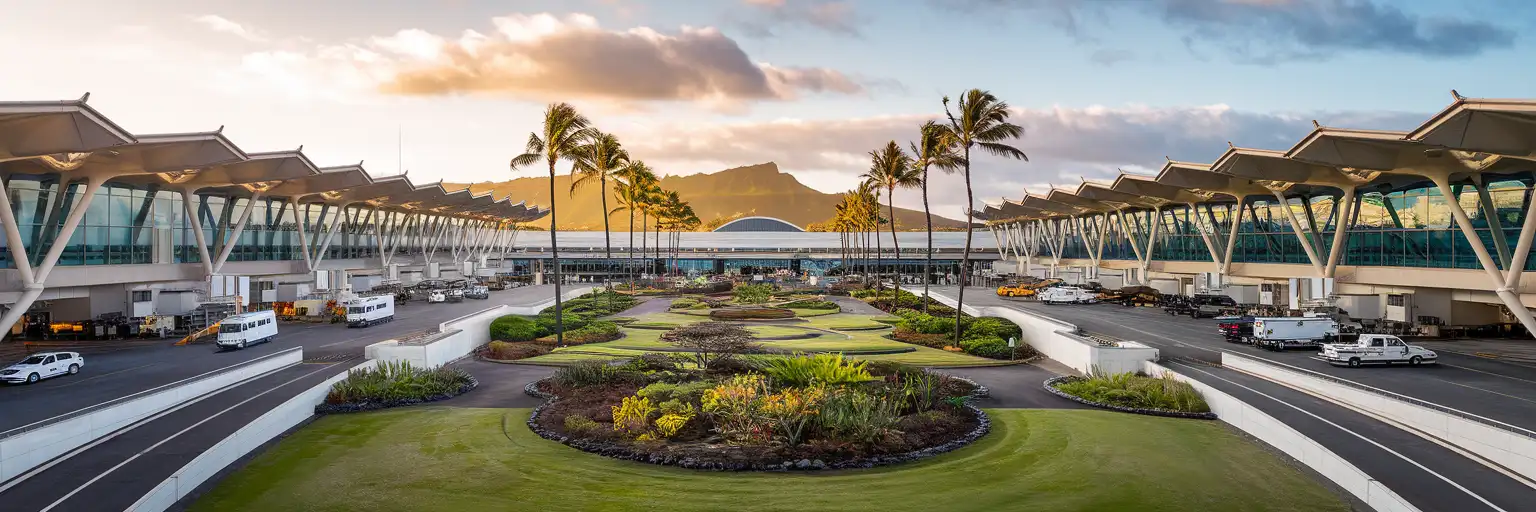
Exterior view of Daniel K. Inouye International Airport Terminal 2 at golden hour with Diamond Head visible in the distance and tropical landscaping

HNL Airport eSIM: Hawaii Data That Works Across All 50 States

Your flight taxis to the gate at Daniel K. Inouye International Airport and you're already pulling up the Uber pickup zone, messaging your Waikiki hotel, and checking which Wiki Wiki Bus connects to the rental car center. With eSIMno, you can buy your US data plan before departure, install at home, and switch it on the moment you land at HNL — no kiosk queue, no passport handover, just instant connectivity from baggage claim to Waikiki Beach.
View Plans
GET A FULL20%OFFon your first order
Use code: FIRSTWELCOME20

Stay connected,
wherever you go

Seamless global eSIM coverage

Explore our plans below

Plan Your Trip

Tell us what you'll do and how long you'll be away — we'll highlight the right plan.

7 days
1102030

What will you do?

Tap an activity above to see which plan fits your trip

Already a customer?

EARN UP TOON EVERY FRIEND'S PURCHASE
NETWORK: AT&T & Verizon Wireless The speed may vary depending on the location.

Quick Facts

Time Zone
Hawaii-Aleutian Standard Time (UTC-10, no daylight saving)
Dialing Code
+1
Currency
US Dollar (USD, $)
Power Plug
Type A, B (flat 2-pin, common across North America)
Language
English
Emergency
911 (police, fire, ambulance)
eSIMno Networks
AT&T, Verizon Wireless

How to Get Your eSIM

  1. Pick your US data plan
    Choose from eSIMno's USA plans — coverage works at HNL and across all 50 states. Select the data amount and validity that matches your Hawaii trip length.
  2. Install at home before your flight
    Scan the QR code over your home WiFi and download the eSIM profile. The whole process takes under 5 minutes — complete it before you head to the airport.
  3. Keep your home SIM active for calls
    Your phone runs both SIMs simultaneously. The eSIMno plan handles data (maps, rideshare, messaging); your home SIM receives incoming calls without roaming data charges.
  4. Activate after landing at HNL
    Once your aircraft reaches the gate and you switch off airplane mode, enable the eSIM data line in your phone settings. By the time you're walking through the Diamond Head Concourse toward baggage claim, your phone is already pulling live gate updates.
  5. Use data from arrivals to Waikiki and beyond
    Pull up the Uber pickup zone on Terminal 2's second level, check TheBus Route 19 timing to Ala Moana, or book a Speedi Shuttle to your hotel — your data works the moment you need it and keeps working across every Hawaiian island and the US mainland.

Traveler Tips

  • International arrivals clear customs at the Diamond Head Concourse — budget 45-90 minutes from touchdown to curb during peak trans-Pacific arrival banks (late morning local time).
  • The Wiki Wiki Bus connects Terminal 1, Terminal 2, and the Rental Car Center landside — free, runs every 10-15 minutes, and saves a 15-minute walk between Southwest gates and Hawaiian Airlines concourses.
  • Rideshare pickups happen on the second-level departures roadway at Terminals 1 and 2 — follow the Uber/Lyft signs after exiting baggage claim and take the escalator or elevator up one floor.
  • TheBus Routes 19 and 20 run to Waikiki for $3.00 (HOLO card) but restrict luggage to what fits on your lap — if you're traveling with full-size bags, rideshare or shuttle is the better call.
  • Activate your eSIM after landing rather than before boarding — switching it on at your departure airport may pull data from your home network before you even take off.

Why You Need an eSIM at HNL

Daniel K. Inouye International Airport moves fast once you clear the Federal Inspection Service area on the Diamond Head Concourse. Immigration queues vary from 20 minutes to over an hour depending on how many widebodies land in the same bank — JAL, ANA, Korean Air, and Philippine Airlines arrivals often cluster between 09:00 and 11:00 local time. By the time you reach baggage claim, your phone needs to be working: the hotel shuttle confirmation, the Uber pickup pin, the group chat with whoever's meeting you curbside.

Ground Transport Coordination

Rideshare pickups at HNL happen on the second-level departures roadway — not at arrivals. Follow the signs from baggage claim, take the escalator up, and pull open the Uber or Lyft app. Surge pricing spikes when multiple flights land simultaneously; real-time fare comparison on your phone beats standing at a crowded curb waiting for rates to drop. The Wiki Wiki Bus runs free between Terminal 1, Terminal 2, and the Rental Car Center — departure times display on Google Maps when your data is active.

Connecting Flights and Interisland Hops

If you're connecting to Maui, Kona, or Lihue, gate changes happen. Hawaiian Airlines operates from the Diamond Head Concourse; Southwest flies from Terminal 1. Walking between them takes 15-20 minutes including a security re-clear. Real-time gate updates on the Hawaiian Airlines app or Google Flights beat the overhead announcements — the concourse speakers compete with jet noise and the open-air garden sections.

With eSIMno plans for Daniel K. Inouye International Airport, Honolulu, Hawaii, United States, you're covered from the moment you taxi in until you board your connecting flight, drive out to the North Shore, or fly home from any US airport weeks later. One plan, nationwide coverage, no SIM kiosk queue.

Visiting HNL

Honolulu's airport sits 6 km northwest of downtown and roughly 14 km from Waikiki. Taxi fare to Waikiki runs $40-55 with a 20-40 minute drive depending on H-1 Freeway traffic. Rideshare fares fluctuate $30-50. Speedi Shuttle and Roberts Hawaii Express offer shared-van service to Waikiki hotels for around $20-25 per person.

The Skyline rail extension to the airport is under construction — until it opens, TheBus remains the only public transit option. Routes 19 and 20 reach Waikiki in 60-80 minutes for $3.00 (HOLO card), but luggage restrictions make rideshare or shuttle the practical choice for most arrivals. The Rental Car Center connects to Terminal 2 via the free Wiki Wiki Bus; all major brands (Hertz, Avis, Enterprise, National, Budget, Dollar, Alamo) operate from the consolidated facility.

Inside HNL Terminal

Solo male traveler walking through the open-air Cultural Gardens at Daniel K. Inouye International Airport Terminal 2 with smartphone in hand
Activate your eSIM before takeoff so your phone connects the moment you taxi into HNL.

Compare eSIM Options at Daniel K. Inouye International Airport

Recommended
Local SIM / Operator
Roaming
Setup timeStore visit + paperworkAuto
No local ID neededSSN/Credit checkUse home account
SpeedCarrier-gradePartner-dependent
Travel supportEnglish onlyHome carrier hours
Keep home numberReplaces itSame number
Cost predictabilityBills can spikeBill-shock risk
5GB / 30 daysLight traveler
15GB / 30 days
$45.00
~$45.00/mo + taxes & fees.
$12-18 / day
$15.00
Typical day-pass tariff varies by home carrier
10GB / 30 daysStandard travelerMost popular
20GB / 30 daysHeavy traveler

Frequently Asked Questions (FAQs)

Activate after your aircraft reaches the gate at Daniel K. Inouye International Airport and you switch off airplane mode. By the time you're walking through the Diamond Head Concourse toward baggage claim, your phone is already pulling directions to the Uber pickup zone on Terminal 2's second level.

Yes — eSIMno plans cover the entire United States, including all Hawaiian islands. Whether you're connecting through Terminal 1 on Southwest or staying on the Diamond Head Concourse with Hawaiian Airlines, the same data works at HNL and on every interisland hop.

Uber and Lyft pickups happen on the second-level departures roadway at Terminals 1 and 2. After collecting your bags, follow the rideshare signs, take the escalator up one floor, and request your ride. Having data active lets you track driver arrival time and adjust your pickup pin if the curb is crowded.

Your phone runs both SIMs simultaneously. The eSIMno plan handles all data — maps, messaging, rideshare apps, hotel confirmations. Your home SIM stays active for incoming calls. Use WhatsApp, FaceTime, or Google Meet over eSIM data for outgoing calls to avoid roaming voice charges.

The airport offers free WiFi, but registration adds friction when you're juggling bags after a long trans-Pacific flight. Coverage varies between the open-air Cultural Gardens and the enclosed gate areas. An eSIM bypasses the captive-portal signup entirely and keeps working from the jet bridge to the rental car center.

Absolutely — one eSIMno plan covers all 50 states. If your itinerary extends from Honolulu to Los Angeles, San Francisco, or anywhere else on the mainland, the same data keeps working. No SIM swap, no additional purchase, just continuous coverage coast to coast.

GET A FULL20%OFFon your first order
Use code: FIRSTWELCOME20

Stay connected,
wherever you go

Seamless global eSIM coverage

Get Started
Daniel K. Inouye International Airport handles the majority of trans-Pacific arrivals into Hawaii, with passengers streaming through Terminal 2's Diamond Head Concourse from Asia, Oceania, and the US mainland. The arrival flow moves fast once you clear customs — baggage carousels spin, rideshare apps ping pickup zones, and the Wiki Wiki Bus shuttles passengers between terminals and the rental car center. Having data active the moment you step off the jet bridge means your hotel confirmation, ground transport booking, and group chat with whoever's meeting you all work before you reach the curb. HNL's open-air Cultural Gardens between concourses offer a brief tropical respite, but the real connectivity test comes at the arrivals roadway where Uber and Lyft pickups cluster on the second level. Surge pricing spikes during the late-morning trans-Pacific arrival banks when multiple widebodies land within the same hour. Real-time fare comparison on your phone beats waiting for the surge to clear while standing at a dead WiFi hotspot. The same data keeps working on TheBus Route 19 toward Waikiki, on the drive down the H-1 Freeway, and across every island you visit afterward. An eSIMno plan covers the entire United States, not just Oahu. Whether you're connecting onward to Maui, the Big Island, or the mainland, the same data works coast to coast. Activate after landing at HNL, use it through your Hawaii trip, and keep it running if your itinerary extends to or — one purchase, nationwide coverage, no SIM swaps required.
Back to United States
No more SIM kiosks

No more SIM kiosks

Skip the airport queues. Install your eSIM at home, activate when you land.

no roaming charges

No roaming surprises

Forget the $200 phone bill three weeks after your trip. Plain pricing, no hidden fees.

keep your physical sim

Keep your home number

Dual-SIM means your physical SIM stays active for calls and texts. eSIM handles only data.

easy installation

Setup in 2 minutes

Scan QR code, follow on-screen steps, you're connected. Works on any eSIM-compatible phone.

Pay SafelyVisa CardMaster CardGoogle PayPayPalApple Pay

How does eSIMNo Works?

Experience seamless global connectivity with our personal eSIM service. Enjoy faster speeds, wider coverage, and the convenience of online purchasing.

Buy a Data Plan

Buy a Data Plan

Search for your destination and pick any data plan

Step 1

Install your eSIM

Install your eSIM

Easy installation via qr code

Step 2

Activate Your eSIM

Activate Your eSIM

Only active when you are ready to use data

Step 3

Advantages

24/7 Customer Support

Reach our team via WhatsApp and email during business hours. Quick answers to common questions available anytime through our automated assistant.

Immediate delivery

Your eSIM arrives by email within minutes. Install it before you board your flight.

Worldwide Coverage

One eSIM, 160+ countries. Land anywhere and connect instantly — no SIM swapping, no roaming charges.

Check Compatibility

Check Compatibility

Before buying and installing an eSim, check if your phone supports one

Check if your phone is eSIM compatible

As you feel the need to use eSIM on your phone, the first question that arises is: does your mobile support eSIMs? And do eSIM-compatible devices work in all regions worldwide?

Some phones that support eSIM technology

  • IPhone XS and Later
  • Samsung Galaxy S20 and Later
  • Pixel 4 and Later
  • Xiaomi 12T Pro and Later
All eSIM-Compatible Phones

Frequently Asked Questions (FAQs)

Find helpful information to answer your questions

Can I use the eSIM for my smartwatch?
Some smartwatches (Apple Watch Cellular, Samsung Galaxy Watch LTE) support eSIM, but they typically require a plan from your home carrier rather than a travel eSIM. eSIMno plans are designed for phones and tablets - check device compatibility before purchase if you intend to use a wearable.
Which eSIM is best for travelling to United-states?
eSIMno is an excellent option for travelers heading to United-states. We offer a diverse range of eSIM plans - including regional, local, and lifetime options - with reliable coverage on local networks.
What makes eSIMno different from other eSIM services?
eSIMno partners directly with local operators in over 200 countries, eliminating intermediaries. This direct relationship lets us offer competitive pricing, extensive coverage, and faster activation than resellers who route data through third parties.
When should I set up my eSIM?
A Wi-Fi connection is required to install your eSIM, so we recommend setting it up before you leave home. Activation can happen later, either right before departure or after you land at your destination - but the initial QR scan needs Wi-Fi.
What should I do if I lose my activation QR code?
You can't really lose it - your QR code is in your order confirmation email, and also in the install pop-up on the website. To reopen it any time before activation, tap "Install eSIM" in your order email, or sign in at esimno.com and go to Profile > My eSIMs > Install. Both show the QR code together with the one-tap install link and the manual SM-DP+ / activation code. Note the install codes are one-time-use: once the eSIM is installed on a device they can't be reused - reopen the installer (My eSIMs > Install) to display a fresh QR if you need one.
Can I switch the eSIM to a different phone after activation?
Generally no. Once an eSIM is activated on a device, it's tied to that device. If you switch phones, you'll need to install a new eSIM. Some carriers offer eSIM transfer features, but eSIMno plans don't currently support transfer between devices.
What is the price range for the United-states eSIM plans?
Prices commence at $4.90 and vary according to data allowance and plan duration. Larger data plans and longer durations cost more, but the per-GB rate decreases with bigger packages.
Can I share data from my eSIM with someone else's phone?
Yes, through Personal Hotspot. Activate hotspot on your phone, share the password, and the other device connects to your data. Data used by connected devices counts toward your eSIM plan, so monitor usage to avoid running out faster than expected.
How can I purchase the United-states eSIM?
You can purchase your eSIM directly from the eSIMno website - select a United-states plan and complete the payment. Within minutes you'll receive an order confirmation email that contains everything you need to install: a QR code, a one-tap install link, the SM-DP+ address and activation code, plus an "Install eSIM" button. You can install straight from that email, or sign in anytime and go to Profile > My eSIMs > Install to get the same options.
How fast does the eSIM activate after I switch off airplane mode?
Activation typically takes 10-30 seconds after airplane mode is switched off, depending on local network availability. In some cases it's nearly instant; in remote areas it may take a minute or two. If it doesn't connect within 5 minutes, restart your phone or check that data roaming is enabled.
How do I delete an eSIM I no longer need?
On iPhone: Settings > Cellular > tap the eSIM line > Remove eSIM. On Android: Settings > Network & Internet > SIMs > tap the eSIM > Erase. Deleting the eSIM frees up a profile slot. Make sure you don't need it anymore - once deleted, you can't reinstall the same profile.
Is the eSIM connection secure?
eSIM connections are as secure as standard cellular connections - encrypted by the carrier network. For added security on public networks (cafes, airports), use a VPN. The eSIM profile itself is digitally signed and can't be cloned like a physical SIM.

Use Your Free Credit

You can earn up to 15% commission from your friends' purchases with your Reference code. Plus, your friends will get $2 off their first purchase when they use your code!

FIND OUT HOW
Refer a friend

Refer

A FRIEND

Step into the world of E-SIM, bring your friends and benefit together!